

 Lets Talk
DevSecOps is a software delivery approach that integrates security into every stage of the development lifecycle, from planning and coding to deployment and runtime monitoring. Instead of treating security as a final review, teams use shared ownership, automated checks, and continuous feedback to identify risks earlier and release software more securely. Modern applications rely on cloud infrastructure, open-source dependencies, containers, APIs, and frequent releases. DevSecOps addresses this gap by making security part of the same workflows used to build, test, deploy, and operate software.
TL;DR
- DevSecOps means development, security, and operations teams working together throughout the software delivery lifecycle.
- Security checks are introduced during planning, coding, builds, testing, deployment, and production monitoring.
- Automated controls help identify vulnerable code, risky dependencies, exposed secrets, insecure containers, and cloud misconfigurations earlier.
- DevSecOps extends DevOps by adding security guardrails to existing delivery workflows.
- Security remains important after deployment because new vulnerabilities and configuration risks can emerge in production.
- Teams should introduce DevSecOps gradually, starting with high-impact risks and actionable findings.
What Does DevSecOps Mean?
DevSecOps stands for development, security, and operations.
It extends the principles of DevOps in software development by integrating security into everyday engineering workflows.
Each discipline contributes a specific responsibility:
| Area | Primary Focus |
| Development | Plan, write, test, and improve application code |
| Security | Identify risks, enforce safeguards, and reduce exposure |
| Operations | Deploy, monitor, maintain, and support applications in production |
According to Red Hat’s DevSecOps guide, DevSecOps integrates security as a shared responsibility throughout the IT lifecycle.
Traditional delivery models often treated security as a separate checkpoint after an application was built. This created a predictable problem: vulnerabilities discovered late in the process required urgent fixes, delayed releases, or risky exceptions.
DevSecOps changes the sequence. Security becomes part of the delivery process from the beginning.
Traditional workflow:
Plan → Build → Test → Deploy → Conduct security review
DevSecOps workflow:
Plan securely → Code securely → Test continuously → Deploy with guardrails → Monitor continuously
Original Visual: The DevSecOps Lifecycle Loop
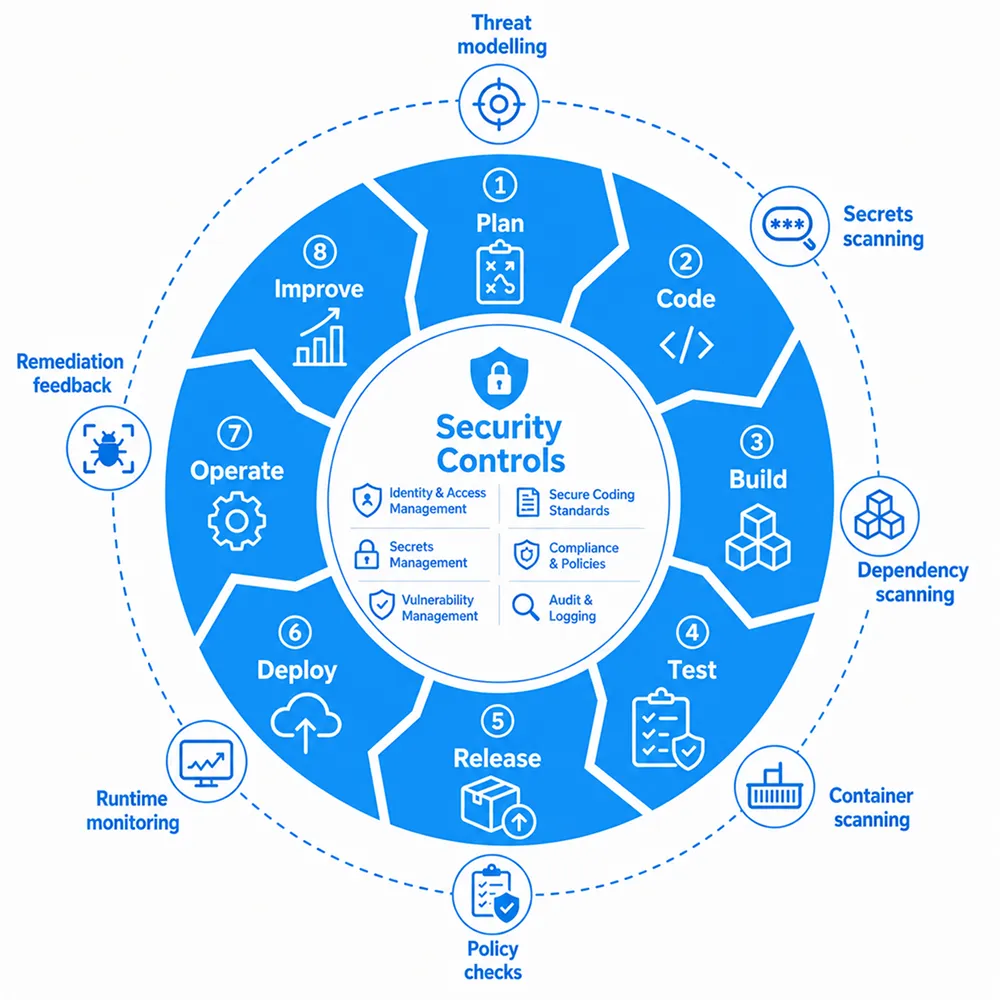
Place Security Controls in the centre of the loop.
Add small examples around the outer edge:
- Threat modelling
- Secrets scanning
- Dependency scanning
- Container scanning
- Policy checks
- Runtime monitoring
- Remediation feedback
Suggested image alt text: DevSecOps lifecycle diagram showing security controls integrated from planning and coding through deployment, monitoring, and continuous improvement.
Why Is DevSecOps Important?
Software delivery has changed.
Many teams no longer release large updates every few months. They deliver smaller improvements frequently through automated pipelines. A structured CI/CD pipeline can build, test, validate, and prepare code changes for deployment much faster than manual release processes.
Security practices must evolve at the same pace.
When security appears only near the release date, teams encounter several problems:
- Vulnerabilities are discovered after development work is complete.
- Developers must interrupt planned work to address urgent issues.
- Security teams become approval bottlenecks.
- Cloud misconfigurations can reach production.
- Outdated dependencies remain unnoticed.
- Teams accumulate security debt as the product grows.
- Manual evidence collection complicates audits and enterprise reviews.
A code vulnerability found during a pull request is usually easier to fix than the same vulnerability found after deployment. An infrastructure misconfiguration detected before provisioning is safer to resolve than one discovered after customer data is exposed.
The objective is not to choose between speed and security. The objective is to design a delivery process where security supports reliable speed.
How Does DevSecOps Work?
DevSecOps works by adding security activities to the workflows developers already use.
A typical process looks like this:
- Teams identify security risks during planning.
- Developers receive feedback while writing and reviewing code.
- Automated checks run when code is committed or merged.
- The pipeline scans application code, dependencies, containers, and infrastructure definitions.
- High-confidence security issues can block a release before deployment.
- Applications and infrastructure are monitored after release.
- Production findings are fed back into future development work.
The result is a continuous feedback loop rather than a one-time audit.
AWS describes DevSecOps as integrating security testing at every stage of software development. Automation makes this practical when teams release changes frequently.
Smaller Code Changes Make Security Easier to Manage
Large releases contain more changes, making vulnerabilities harder to isolate and remediate.
Practices such as trunk-based development encourage developers to merge smaller code changes more frequently. This creates faster feedback cycles and makes it easier to identify which change introduced a vulnerability.
Git-Based Workflows Improve Traceability
Some teams use Git as the source of truth for approved configuration and deployment changes.
This approach supports auditability, controlled deployments, and rollback readiness. To understand where this model fits, review the differences between GitOps and DevOps.
Platform Guardrails Help Teams Scale
As engineering teams grow, reusable security policies and standard delivery paths become increasingly valuable.
Platform teams can provide approved templates, secure defaults, and reusable workflows so developers do not rebuild controls for each application. For a broader explanation of this operating model, explore platform engineering vs DevOps.
What Are the Stages of the DevSecOps Lifecycle?
The DevSecOps lifecycle adds relevant security checks to each software delivery stage.
The NIST Secure Software Development Framework provides a broader reference for integrating secure software development practices into the software lifecycle.
| Lifecycle Stage | Security Focus | Example Controls |
| Planning | Identify risks before development starts | Security requirements, threat modelling, architecture review |
| Coding | Prevent avoidable vulnerabilities | Secure coding guidance, pull-request reviews, secrets scanning |
| Build | Validate code and dependencies | Static analysis, software composition analysis |
| Testing | Identify application-level weaknesses | Dynamic testing, API security checks, validation tests |
| Release | Confirm approved artifacts are safe | Container-image scanning, artifact verification |
| Deployment | Prevent risky infrastructure changes | Infrastructure-as-code scanning, policy validation |
| Operations | Detect emerging risks after release | Runtime monitoring, vulnerability management, alerting |
| Feedback | Improve controls continuously | Remediation tracking, incident review, backlog prioritization |
Illustrative Example: Securing a Checkout Update
Consider a team releasing a new checkout feature.
During planning, the team identifies that the feature will handle payment-related data and requires stricter access controls.
During development, automated checks scan code changes for exposed secrets and insecure patterns.
During the build, the pipeline validates third-party dependencies and scans the container image.
Before deployment, infrastructure definitions are checked for risky settings.
After release, runtime monitoring tracks unusual activity, error patterns, and configuration changes.
This workflow does not require a separate security project for every feature. Security becomes part of the normal delivery path.
What Are the Core Principles of DevSecOps?
DevSecOps is not defined by a single product or platform. It is an operating model based on several principles.
Security Is a Shared Responsibility
Security cannot sit exclusively with one specialist team at the end of a release cycle.
Developers make decisions about code and dependencies. DevOps teams manage pipelines and infrastructure. Operations teams monitor production systems. Security teams define guardrails and prioritize risks.
Each group contributes to secure delivery.
Security Starts Early
Risks should be discussed while features and architectures are still being planned.
A lightweight threat-modelling discussion before development can prevent avoidable rework later. Checks during commits and pull requests help developers fix issues while the context is still fresh.
Repetitive Checks Should Be Automated
Manual reviews remain valuable for complex decisions. However, repeated tasks such as secrets scanning, dependency validation, and container scanning should be automated where practical.
Automation helps teams apply controls consistently across frequent releases.
Security Gates Should Be Risk-Based
A pipeline that blocks every minor issue quickly becomes a bottleneck.
Teams should define which findings require immediate action. A leaked credential or critical exploitable vulnerability may justify blocking deployment. A low-risk issue may be logged for planned remediation.
Security Continues After Deployment
A successful deployment does not mean security work is complete.
Production systems require runtime monitoring, vulnerability management, configuration review, and remediation planning.
What Security Checks Belong in a DevSecOps Pipeline?
The appropriate security controls depend on your application, infrastructure, risk profile, and delivery maturity.
The following categories provide a practical starting point.
Static Application Security Testing
Static application security testing reviews source code before the application runs.
It can identify insecure coding patterns and common vulnerabilities during development or builds.
Software Composition Analysis
Modern applications depend heavily on open-source libraries and third-party packages.
Software composition analysis helps teams identify known vulnerabilities, outdated packages, and dependency risks before a release.
Secrets Scanning
Credentials should not be stored in source-code repositories.
Secrets scanning identifies API keys, access tokens, passwords, and private keys before they are committed or merged.
Dynamic Application Security Testing
Dynamic testing evaluates a running application from an external perspective.
It helps identify vulnerabilities that become visible when the application is active.
Infrastructure-as-Code Scanning
Cloud resources should be validated before they are provisioned.
Infrastructure-as-code scanning helps detect risky access permissions, exposed storage, missing encryption, and insecure network rules.
For a deeper explanation of repeatable cloud provisioning and infrastructure risk, explore how infrastructure as code reduces operational risk.
Container-Image Scanning
Containers can introduce vulnerabilities through base images, operating-system packages, and application dependencies.
Container-image scanning checks whether an image contains known vulnerabilities before it is promoted to production.
For an implementation example, review this guide to standardizing Docker in DevOps pipelines.
Runtime Monitoring
Security remains important after deployment.
Runtime monitoring helps teams detect suspicious behaviour, new vulnerabilities, configuration drift, and unusual application patterns.
It becomes more effective when teams connect security signals with logs, metrics, and traces. Learn how observability in DevOps helps teams understand why incidents occur, not only when something has failed.
Who Is Responsible for Security in DevSecOps?
DevSecOps succeeds when teams define clear ownership.
| Role | Primary Responsibilities |
| Developers | Write secure code, review findings, resolve vulnerabilities |
| Security teams | Define controls, prioritize risks, guide remediation |
| DevOps and platform teams | Integrate security checks into pipelines and infrastructure workflows |
| Operations teams | Monitor production systems and respond to incidents |
| Engineering leaders | Define ownership, risk tolerance, and escalation paths |
Security teams remain essential. Their role shifts from acting only as final approvers to enabling other teams through policies, guidance, automation, and risk prioritization.
Developers do not need to become full-time security specialists. They need clear feedback and a consistent way to address findings without disrupting delivery.
For a broader explanation of engineering ownership boundaries, read this guide to DevOps and developer roles and responsibilities.
What Are the Business Benefits of DevSecOps?
DevSecOps reduces avoidable security friction while helping teams deliver software consistently.
Identify Vulnerabilities Earlier
Early feedback helps developers resolve issues before they become production incidents or release blockers.
Reduce Late-Stage Rework
Security findings discovered after a feature is complete often require rushed fixes and repeated testing. Earlier validation reduces this disruption.
Improve Release Consistency
Automated controls create repeatable checks across releases. Teams do not need to recreate the review process manually each time.
Reduce Cloud-Configuration Risk
Infrastructure validation helps prevent avoidable issues before cloud resources are provisioned or modified.
Improve Collaboration
Shared workflows reduce friction between engineering, operations, and security teams. Everyone works with the same delivery process and risk priorities.
Improve Security Visibility
Runtime feedback helps teams understand whether risks remain after deployment and whether remediation performance is improving.
Support Compliance Readiness
Automated controls, scan reports, traceable approvals, and deployment histories can simplify security evidence collection.
This is especially relevant when customers request SOC 2 or HIPAA proof during procurement. For a detailed breakdown, read how DevSecOps automates SOC 2 and HIPAA compliance evidence.
What Can Teams Learn From a Real DevSecOps Implementation?
First-Hand Experience: Prioritize Actionable Risk, Not Alert Volume
In one Creole Studios Autonomous DevSecOps Engine implementation, a legacy container environment produced 1,811 theoretical vulnerability alerts.
Treating every finding equally would have created noise and slowed remediation.
The team implemented reachability analysis to distinguish dormant package findings from vulnerabilities the running application could actually reach. This reduced the focus set from 1,811 theoretical risks to 4 reachable threats, resulting in a 99.7% reduction in alert noise.
The implementation also introduced automated remediation pull requests, validation scans, and audit-ready artifact reports. Mean time to remediation decreased from 5 days to under 30 seconds for the automated workflow.
Practical Lesson
A DevSecOps pipeline should not only identify issues. It should help teams prioritize, remediate, validate, and document the risks that matter most.
As automation matures, teams can move beyond scanning towards proactive remediation. This is one example of how AI is transforming DevOps workflows.
What Is DevSecOps Not?
Clarifying common misconceptions helps teams adopt DevSecOps effectively.
DevSecOps Is Not a Replacement for DevOps
DevSecOps builds on DevOps. It adds security practices to the workflows used for automation, collaboration, and continuous improvement.
DevSecOps Is Not a Final Security Review
Security reviews remain valuable, but security should not appear for the first time at the end of the process.
DevSecOps Is Not a Tool-Buying Exercise
Tools support DevSecOps, but they cannot replace ownership, appropriate policies, and developer-friendly workflows.
DevSecOps Is Not About Blocking Every Release
Controls should reflect risk. Teams should block high-confidence, high-severity issues while managing lower-priority findings through a defined remediation process.
DevSecOps Is Not Limited to Regulated Industries
Compliance requirements often make DevSecOps more urgent, but any team handling customer data, cloud infrastructure, or frequent releases can benefit from stronger security workflows.
For a detailed decision framework, review the differences between DevSecOps and DevOps.
Is Your Team Ready for DevSecOps?
DevSecOps becomes increasingly valuable as products, infrastructure, and customer expectations grow.
Use the following checklist as a starting point.
DevSecOps Readiness Checklist
Your team may need stronger DevSecOps practices when:
- Releases happen frequently through CI/CD pipelines.
- Security issues are discovered close to release dates.
- Multiple teams contribute to production systems.
- The application handles sensitive customer or business data.
- Cloud infrastructure is becoming more complex.
- Containers and open-source dependencies are increasing.
- Manual security reviews delay releases.
- Developers receive too many low-priority alerts.
- Infrastructure changes are difficult to audit.
- Enterprise customers request security evidence.
- Security ownership is unclear across teams.
- Production incidents expose gaps in monitoring or remediation.
A team does not need to introduce every control at once.
Start with the risks most likely to affect customers or delay releases. Add checks to one common delivery path, reduce alert noise, and expand gradually.
Before choosing the next priority, assess your current DevOps maturity stage. Smaller teams can also use these DevOps best practices for reducing bugs and downtime to avoid over-engineering the first iteration.
What Should You Do After Assessing Your Readiness?
DevSecOps implementation should be incremental.
Start with one application or delivery path that has clear business value. Establish a reliable baseline, add security checks gradually, define ownership, and evaluate whether each control produces actionable findings.
Use these next steps:
- Select one pilot application.
- Document the current code-to-production workflow.
- Identify the highest-impact security risks.
- Add secrets, dependency, and infrastructure checks.
- Define which issues should block deployment.
- Set remediation ownership and escalation paths.
- Monitor production feedback.
- Expand the workflow gradually.
For a phased adoption path, use this 30-day DevOps implementation roadmap.
Startups comparing practical tooling options can review these DevOps platforms for startups.
If your team does not have enough internal bandwidth, compare managed, in-house, and fractional DevOps models before deciding how to resource the rollout.
Conclusion
DevSecOps integrates security into the workflows used to plan, build, test, deploy, and operate software.
It helps teams identify vulnerabilities earlier, automate repetitive checks, reduce infrastructure risk, improve collaboration, and monitor exposure after release.
The most effective approach is practical and risk-based. Start with the controls that protect your most important applications and delivery paths. Reduce alert noise. Define remediation ownership. Expand automation as your engineering maturity improves.
Build Security Into Your Delivery Pipeline
Review your CI/CD pipeline, cloud infrastructure, and DevSecOps gaps with our DevOps team.

FAQs
What is DevSecOps in simple terms?
DevSecOps means integrating security into every stage of software delivery. Instead of checking for vulnerabilities only before launch, teams add security practices during planning, coding, testing, deployment, and production monitoring.
What does DevSecOps stand for?
DevSecOps stands for development, security, and operations. It describes a collaborative approach where teams share responsibility for building and operating secure software.
Is DevSecOps different from DevOps?
DevSecOps extends DevOps by making security controls more explicit throughout the delivery lifecycle. DevOps focuses on faster and more reliable software delivery. DevSecOps adds security testing, guardrails, and monitoring to support secure delivery.
What are the main stages of the DevSecOps lifecycle?
The main stages are planning, coding, building, testing, releasing, deploying, operating, and continuous improvement. Each stage includes relevant security activities.
What security checks are commonly used in DevSecOps?
Common checks include static application security testing, dependency scanning, secrets scanning, dynamic testing, infrastructure-as-code scanning, container-image scanning, and runtime monitoring.
Does DevSecOps slow down software releases?
A poorly designed process can slow releases, but effective DevSecOps aims to reduce delays. Automated and risk-based controls help teams identify serious issues earlier while avoiding unnecessary manual approvals.
Is DevSecOps only for large companies?
No. Startups and smaller teams can begin with lightweight controls such as secrets scanning, dependency checks, infrastructure validation, and clear remediation ownership.
Does DevSecOps include monitoring after deployment?
Yes. DevSecOps includes production monitoring, vulnerability management, configuration reviews, and feedback loops. Security continues after an application is released.










 30 mins free Consulting
 7 min read
 global
 United States






 Love we get from the world