

 Lets Talk
Construction app development typically costs $40,000 to $500,000 or more. A focused field-management MVP may cost $40,000 to $90,000. A multi-role construction platform generally costs $90,000 to $200,000, while enterprise software with BIM, ERP, IoT, AI, and advanced security can exceed $300,000.
The final budget depends on workflows, roles, offline functionality, integrations, security, and rollout requirements.
TL;DR
- A focused construction app MVP may cost $40,000 to $90,000.
- A mid-complexity platform may require $90,000 to $200,000.
- Enterprise construction software can cost $200,000 to $500,000+.
- Offline synchronization, document control, role permissions, and integrations are major cost drivers.
- A practical MVP should solve one high-value site or office workflow.
- Budget separately for hosting, maintenance, support, training, and future integrations.
- Pilot the app on an active project before company-wide deployment.
How Much Does Construction App Development Cost?
The following figures are early planning ranges, not fixed quotations. Estimate accuracy improves after workflow discovery, technical planning, integration validation, and UX prototyping. Creole Studios’ software cost estimation guidance similarly treats early estimates as planning ranges that become more accurate after discovery and technical definition.
| Development level | Typical scope | Estimated cost | Timeline |
| Prototype | Clickable screens and workflow validation | $10,000 to $25,000 | 3 to 6 weeks |
| Focused MVP | One core workflow, mobile app, basic admin panel | $40,000 to $90,000 | 3 to 5 months |
| Operational platform | Multiple roles, field reports, documents, dashboards | $90,000 to $200,000 | 5 to 9 months |
| Advanced platform | Financial workflows, procurement, analytics, integrations | $180,000 to $350,000 | 8 to 14 months |
| Enterprise ecosystem | BIM, ERP, IoT, AI, multi-company governance | $350,000 to $750,000+ | 12 to 24 months |
Companies validating a new product should first compare these figures with a broader MVP development cost breakdown. A focused first release reduces the risk of investing in modules that field teams may not adopt.
Estimate Your Construction App Cost
Describe your app features, platforms, integrations, and technical requirements to generate an AI-powered development cost estimate.

What Is Included in Construction App Development Cost?
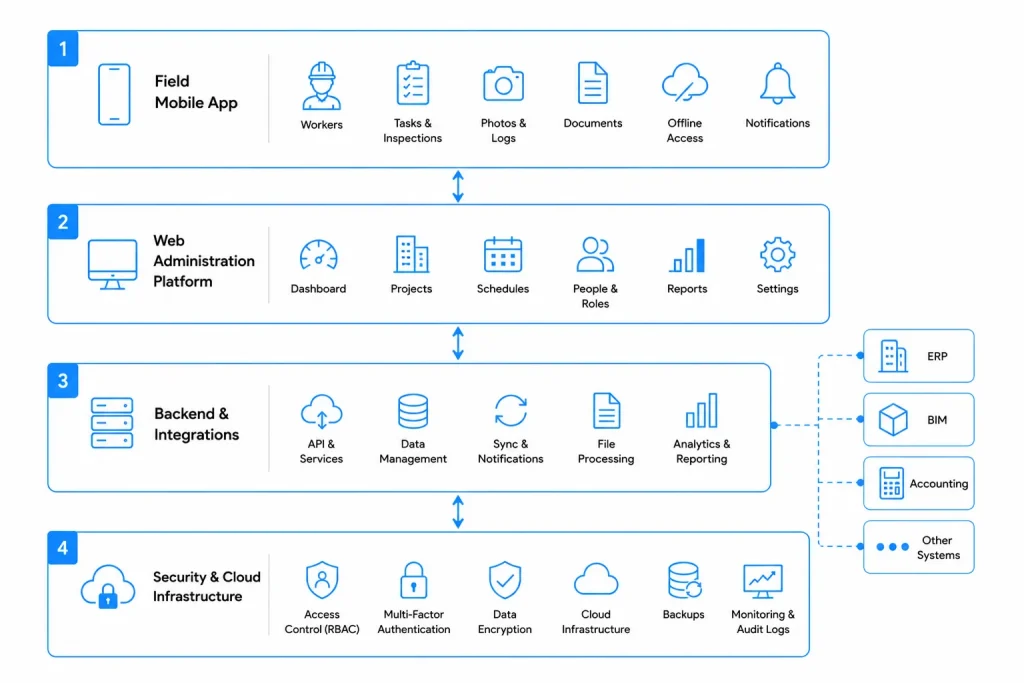
A usable construction product commonly includes four connected layers.
Field Application
The mobile experience may support daily logs, tasks, inspections, punch lists, photographs, time tracking, equipment checks, drawings, digital signatures, and offline data entry.
Field interfaces must remain easy to use in bright light, unreliable connectivity, and time-sensitive site conditions.
Web Administration Platform
Project managers and office teams may need project setup, schedules, document control, approvals, budgets, vendor records, analytics, exports, and audit history.
A construction solution that includes an administrative dashboard should account for the complete web application development cost, not only the mobile interface.
Backend and Integrations
The backend controls permissions, synchronization, notifications, file processing, reporting, and data exchange.
Typical integrations include accounting systems, ERP software, payroll tools, cloud storage, mapping services, BIM platforms, identity providers, procurement systems, and equipment sensors.
Security and Infrastructure
Construction platforms may store financial records, contracts, drawings, employee details, vendor data, and site photographs.
Common controls include encryption, multi-factor authentication, backups, audit logs, secure file access, monitoring, and role-based access. NIST role-based access control guidance explains that access can be managed according to organisational roles, which is particularly relevant when owners, contractors, workers, inspectors, and clients need different permissions.
How Much Do Different Construction Apps Cost?
| Construction app type | Typical capabilities | Estimated cost |
| Site inspection app | Checklists, photographs, signatures, PDF reports | $35,000 to $75,000 |
| Field reporting app | Daily logs, labour, materials, weather, offline mode | $40,000 to $90,000 |
| Safety management app | Incidents, hazards, inspections, corrective actions | $45,000 to $100,000 |
| Workforce app | Attendance, shifts, timesheets, GPS, crew allocation | $50,000 to $110,000 |
| Estimating and bidding app | Takeoffs, cost libraries, bids, approvals | $60,000 to $140,000 |
| Equipment management app | Assets, maintenance, inspections, telematics | $70,000 to $160,000 |
| Project management platform | Tasks, RFIs, drawings, budgets, reports | $90,000 to $220,000 |
| Enterprise platform | Multiple companies, BIM, ERP, analytics | $200,000 to $500,000+ |
The objective should be to improve estimation speed, consistency, traceability, or data reuse, not simply digitise an existing spreadsheet.
Which Features Affect Construction App Development Cost?
User Roles and Permission Rules
Construction software may serve owners, project managers, supervisors, engineers, contractors, subcontractors, workers, inspectors, finance teams, and clients. Each role can require different screens, approval rights, notifications, and data visibility.
Define the permission matrix during discovery. Adding permissions after development begins usually creates backend changes and additional regression testing.
Offline Functionality
Offline support may require local storage, cached documents, queued submissions, automatic retries, conflict detection, and visible synchronization status.
The main complexity is deciding what happens when multiple users edit the same record before reconnecting.
Document and Drawing Management
Document modules may require revisions, approvals, markups, annotations, search, controlled downloads, version comparison, and audit history.
The system must make the latest approved drawing easy to identify. A file repository without strong version rules can create operational risk.
BIM Support
A basic model viewer and a complete BIM coordination environment have very different costs. Clarify whether users need only to view models or also select objects, annotate components, compare revisions, connect model elements to tasks, and manage clashes.
buildingSMART’s IFC documentation defines Industry Foundation Classes as an open international standard for exchanging built-asset and BIM data between software applications.
Safety Workflows
Safety modules may include hazard reports, near-miss records, inspections, corrective actions, acknowledgements, evidence, and escalation rules.
OSHA’s worker participation guidance recommends establishing a process for workers to report injuries, close calls, hazards, and safety concerns. An app can support the process, but it does not replace the employer’s legal and operational responsibilities.
Estimating and Financial Workflows
Cost codes, estimates, purchase orders, change orders, invoices, retention, progress billing, and forecasting require accurate calculations, auditability, and extensive testing.
GPS, IoT, and Equipment Tracking
Location and sensor features may support attendance, geofencing, delivery tracking, equipment utilisation, preventive maintenance, and alerts.
Projects using telematics or connected equipment should separately evaluate IoT app development costs, including device connectivity, data ingestion, cloud processing, alert logic, and ongoing infrastructure.
AI and Computer Vision
AI can support document search, progress summaries, photograph classification, delay prediction, quantity extraction, cost forecasting, and safety monitoring.
Production AI requires suitable data, evaluation criteria, human review, monitoring, usage controls, and fallback workflows. The cost is therefore broader than connecting an application to a model API.
Module-Level Planning Ranges
| Module | Estimated range |
| Authentication and role management | $6,000 to $15,000 |
| Project and task management | $12,000 to $30,000 |
| Daily logs and field reporting | $10,000 to $25,000 |
| Document and photograph management | $12,000 to $30,000 |
| Offline mode and synchronization | $15,000 to $40,000 |
| GPS and time tracking | $15,000 to $35,000 |
| Estimating and budget management | $20,000 to $50,000 |
| Third-party integration | $8,000 to $30,000 per integration |
| BIM functionality | $30,000 to $100,000+ |
| AI or computer vision | $25,000 to $100,000+ |
These ranges overlap because modules share design, backend, infrastructure, and testing work. Do not add them together as a fixed-price formula.
What Should a Construction App MVP Include?
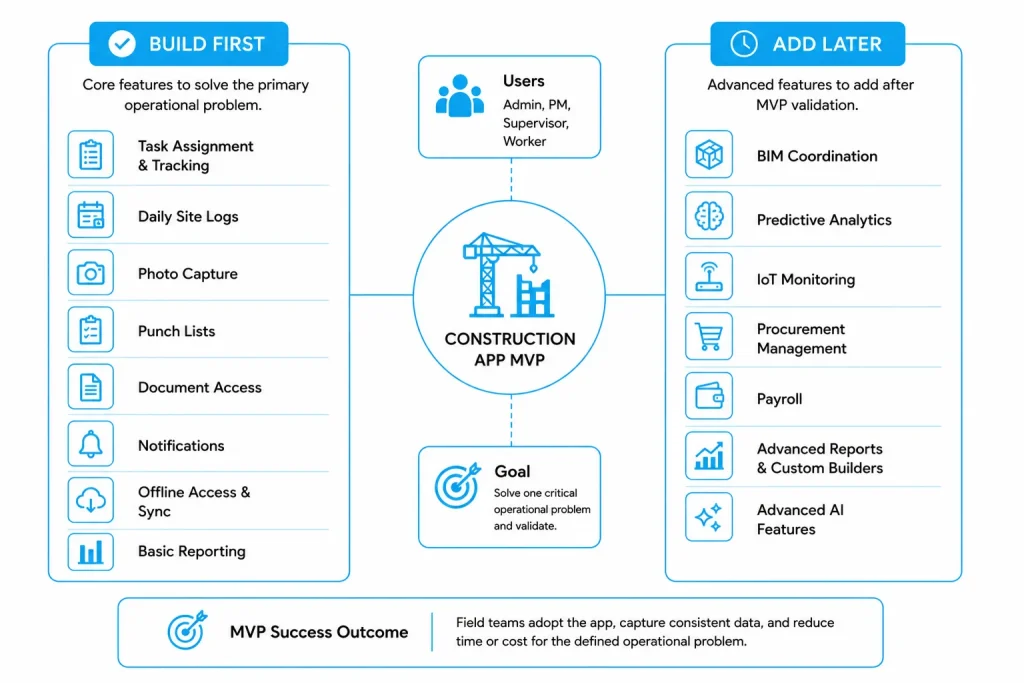
A strong MVP solves one expensive operational problem for a defined user group.
A practical field-management MVP may include:
- Secure login and password recovery
- Administrator, project manager, supervisor, and worker roles
- Project directory
- Task assignment and status tracking
- Daily site logs
- Photograph capture linked to projects or issues
- Punch lists
- Approved document access
- Offline data capture and synchronization
- Notifications
- Basic web administration
- Activity and issue reports
Delay BIM coordination, predictive analytics, complex procurement, payroll, advanced AI, IoT monitoring, and custom report builders until the core workflow has been validated.
Should You Build or Buy Construction Software?
| Situation | Buy software | Configure or integrate | Build custom |
| Workflows are standard | Strong fit | Possible | Usually unnecessary |
| Fast deployment is essential | Strong fit | Strong fit | Weak fit |
| Existing software covers most needs | Strong fit | Strong fit | Weak fit |
| Proprietary workflows create value | Limited fit | Possible | Strong fit |
| Several legacy systems must connect | Limited fit | Strong fit | Strong fit |
| Advanced offline behaviour is required | Varies | Varies | Strong fit |
| Product will be sold to other firms | Weak fit | Limited fit | Strong fit |
Custom development is easier to justify when operational gaps affect productivity, data quality, integration, reporting, or commercial differentiation.
How Long Does Construction App Development Take?
A focused MVP commonly takes three to five months. A multi-module product may require five to nine months. An enterprise platform is usually delivered in phases over 12 to 24 months.
| Stage | Typical duration |
| Workflow discovery | 2 to 4 weeks |
| Architecture and planning | 1 to 3 weeks |
| UX design and prototype testing | 3 to 6 weeks |
| MVP development | 10 to 18 weeks |
| Integration and system testing | 3 to 8 weeks |
| Active-site pilot | 3 to 6 weeks |
| Rollout and training | 2 to 6 weeks |
A site pilot should use real drawings, photographs, roles, network conditions, and project volumes. Testing only with clean demonstration data can hide synchronization, usability, and performance problems.
How Can You Reduce Construction App Development Cost?
- Start with one measurable workflow instead of a complete platform.
- Validate high-risk integrations before full development.
- Define offline conflict rules during discovery.
- Reuse existing accounting, payroll, identity, and storage systems.
- Standardise cost codes, forms, project names, and document structures before migration.
- Use cross-platform mobile development when specialised native functionality is not required.
- Pilot with one project team before wider rollout.
- Prioritise reports that answer specific management questions.
Cost control should remove low-value scope, not essential testing, security, or architecture work.
What Are the Ongoing Costs?
The development estimate should be separated from the total cost of ownership.
Ongoing expenses include hosting, file storage, third-party APIs, monitoring, backups, support, training, security updates, integration maintenance, bug fixes, and product improvements.
An early planning allowance of 15% to 20% of initial development cost per year may be used for maintenance and incremental improvement, but the actual figure depends on usage, integrations, support expectations, and release frequency. The current Creole Studios construction guide also uses this annual planning range.
How Can You Estimate Construction App ROI?
Measure ROI through operational outcomes such as:
- Time saved on daily reports
- Faster punch-list closure
- Reduced duplicate entry
- Lower rework
- Faster invoice approval
- Improved equipment utilisation
- Reduced document-control effort
- Faster access to project information
Annual ROI = (Annual financial benefit – Annual app cost) ÷ Annual app cost × 100
Illustrative Example
Assume 60 users each save 20 minutes per working day. At 22 working days per month and an illustrative loaded labour rate of $45 per hour:
60 × 0.33 hours × 22 × $45 = approximately $19,800 saved per month
If operating costs are $4,800 per month, the estimated net benefit is $15,000. A $120,000 initial investment would have an illustrative payback period of eight months.
Use the same method explained in this guide to measure ROI against mobile app development cost, but replace assumptions with verified payroll, rework, support, and billing data.
Plan Your Construction App Budget
Estimate your development, integration, infrastructure, and post-launch expenses with our free Web Application Budget Planner.

First-Hand Experience: What Usually Affects Adoption?
Five implementation lessons repeatedly matter:
- Long forms reduce field participation. Capture only information required for a decision, record, or compliance process.
- Users must see whether data is saved locally, pending, failed, or synchronized.
- Photographs should be linked to a project, location, task, inspection, or issue.
- Permissions should match actual responsibility, not job titles alone.
- Training should explain the new workflow, not only the interface.
A technically complete product can still fail when it creates more site administration than it removes.
Conclusion
Construction app development usually costs $40,000 to $500,000 or more. The strongest cost drivers are workflow complexity, permissions, offline synchronization, document control, BIM, financial rules, integrations, and security.
Start with one high-value operational problem, validate the workflow on an active project, and expand only after measuring adoption and business impact. This phased approach creates a more reliable budget and reduces the risk of building a large platform that teams do not use.
Frequently Asked Questions
How Much Does a Construction App MVP Cost?
A focused construction app MVP commonly costs $40,000 to $90,000. It may include user roles, projects, tasks, site logs, photographs, punch lists, notifications, offline access, and basic administration.
How Long Does It Take to Build a Construction App?
A focused MVP may take three to five months. A multi-module platform may require five to nine months, while enterprise construction software can take 12 to 24 months.
What Is the Biggest Construction App Cost Driver?
The biggest driver is usually workflow complexity. Offline rules, permissions, integrations, financial logic, BIM, and document versioning can add more effort than the number of screens.
Should a Construction App Work Offline?
Offline capability is strongly recommended for site-based applications. Users should be able to access essential information and record progress when connectivity is unavailable.
How Much Does a Procore-Like App Cost?
A focused product covering selected project-management workflows may cost $150,000 to $300,000. A broader enterprise platform with financial controls, document management, workforce tools, analytics, and integrations can exceed $500,000.








 30 mins free Consulting
 10 min read

 Singapore
 USA
USA 
 Finland





 Love we get from the world