

 Lets Talk
A website evaluation checklist helps you determine whether a site is useful, trustworthy, discoverable, secure, accessible, and capable of converting visitors. Review your website against the 50 checks below, score each area, and prioritize failures that block important user journeys. A reliable evaluation combines automated testing with manual review because tools cannot fully judge clarity, credibility, or real-world usability.
TL;DR
- Evaluate eight areas: purpose and credibility, UX, mobile design, performance, SEO, accessibility, security, and functionality.
- Score each check as 0 for failed, 1 for partly met, or 2 for passed.
- Treat broken forms, security risks, indexing problems, and inaccessible critical journeys as urgent, even if the overall score appears acceptable.
- Test representative page types and complete real tasks instead of reviewing only the homepage.
- Download the checklist to record evidence, assign owners, and track fixes.
What Criteria Should You Use to Evaluate a Website?
A useful website evaluation looks beyond appearance. It asks whether users can understand the offer, trust the business, find relevant information, complete important tasks, and use the website across different devices and abilities.
Use these eight website evaluation criteria:
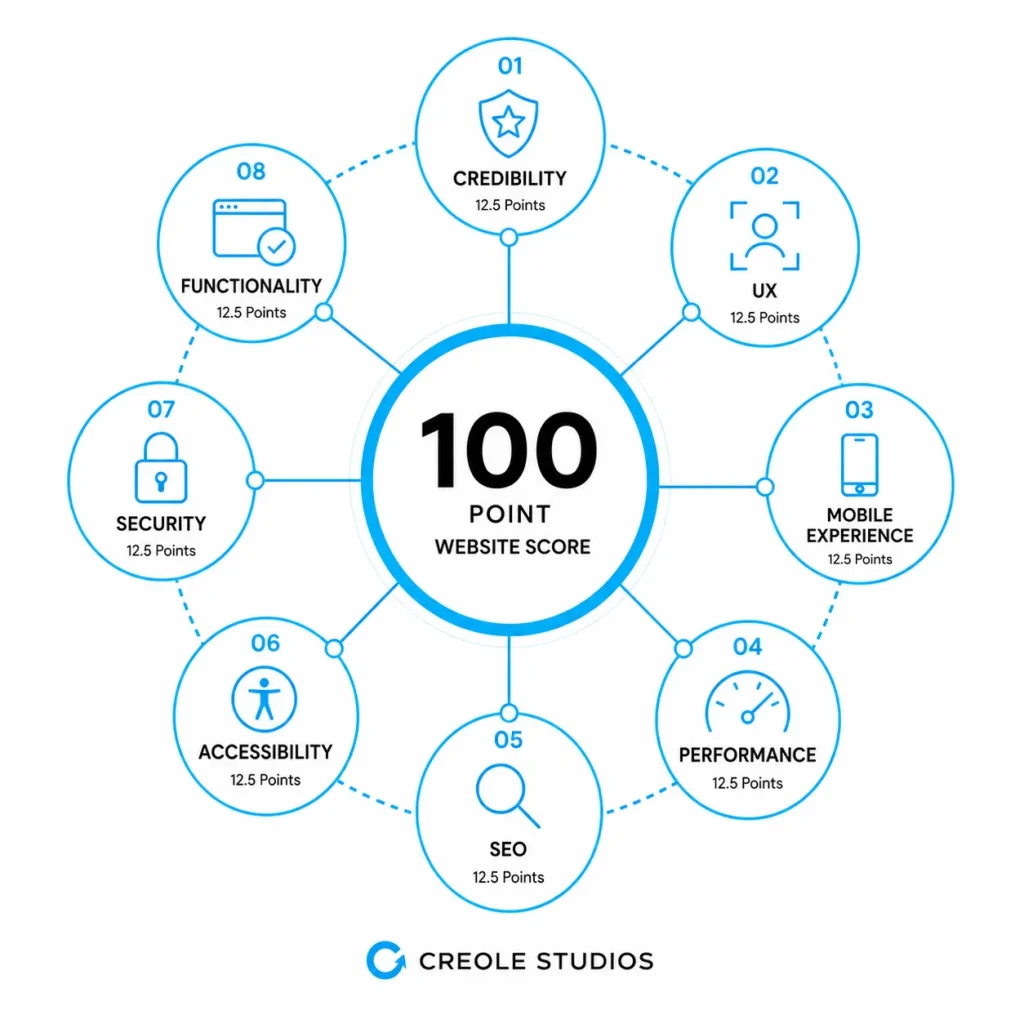
| Area | What You Are Evaluating | Weight |
| Purpose and credibility | Relevance, accuracy, ownership, and trust signals | 15% |
| UX and navigation | Findability, clarity, and task completion | 15% |
| Mobile experience | Responsive layout and touch usability | 10% |
| Performance | Loading, responsiveness, and visual stability | 15% |
| SEO and discoverability | Crawlability, indexing, metadata, and content structure | 15% |
| Accessibility | Access for keyboard and assistive-technology users | 10% |
| Security and privacy | Protection, consent, and responsible data handling | 10% |
| Functionality and compatibility | Reliable journeys, forms, links, and integrations | 10% |
These weights provide a starting point, not a universal rule.
An e-commerce website may give checkout functionality and security more weight. A publisher may prioritize content credibility and search visibility. A SaaS platform may place greater emphasis on authentication, application reliability, integrations, and accessibility.
How Should You Score a Website Evaluation?
Score every check using the following scale:
- 0 = Failed: The requirement is missing, broken, misleading, or creating meaningful risk.
- 1 = Partial: The requirement is present but inconsistent, unclear, or below the expected standard.
- 2 = Passed: The requirement works as intended and is supported by evidence.
Calculate the percentage for each category using this formula:
Category score = Points earned ÷ Available points × 100
Use the following ranges to interpret the overall result:
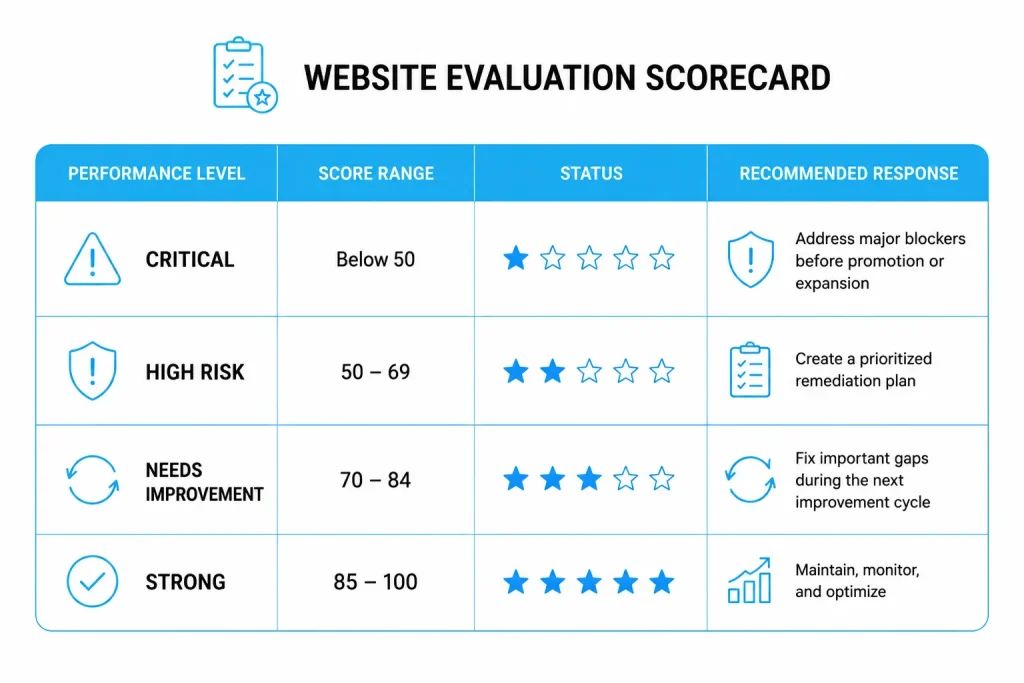
Do not let the overall score conceal a critical failure. A website scoring 86 can still create serious business risk if its checkout is broken, sensitive pages are exposed, or search engines cannot index its most important content.
Practical Experience From Web Projects
The homepage often receives the most attention, so it is rarely the best representation of overall website quality.
Problems typically appear across service-page templates, forms, account states, older articles, and third-party integrations. Evaluate at least one page from every major template and complete the website’s most valuable journeys from beginning to end.
The 50-Point Website Evaluation Checklist
1. Purpose and Credibility
- The page’s purpose and intended audience are clear within the first screen.
- The business name, contact information, and ownership are easy to verify.
- Important claims are supported by evidence, methodology, or authoritative sources.
- Author names, expertise, review details, and update dates appear where relevant.
- Pricing, policies, limitations, and commercial relationships are not misleading.
- Testimonials and case studies include real context and avoid unverifiable results.
- Outdated facts, broken references, and contradictory information have been corrected.
Quick test: Ask someone unfamiliar with the business to explain what the website offers and why they should trust it after viewing it for 30 seconds.
2. UX and Navigation
- Primary navigation uses clear labels and reflects users’ priorities.
- Important information is reachable without unnecessary steps.
- Each page has one clear primary action.
- Headings, summaries, lists, and whitespace make the content easy to scan.
- Search, filters, breadcrumbs, or contextual links support navigation on larger sites.
- Error messages explain what happened and how the user can recover.
- Users can complete critical journeys without confusion or dead ends.
Use this focused web design checklist when visual hierarchy, layout, navigation, and interface consistency require a deeper review.
3. Mobile Experience
- Content fits common mobile widths without horizontal scrolling.
- Navigation, menus, forms, tables, and modals work properly on touchscreens.
- Tap targets are sufficiently large and separated.
- Text is readable without requiring users to zoom.
- Images and videos resize without distortion or overflow.
- Mobile users receive the same essential content and functionality as desktop users.
Manual check: Test the website on a real phone, not only through a browser emulator. Complete the lead, purchase, booking, or login journey using one hand.
4. Performance and Core Web Vitals
- Important templates pass field-based Core Web Vitals where sufficient data is available.
- Largest Contentful Paint is 2.5 seconds or less at the 75th percentile.
- Interaction to Next Paint is 200 milliseconds or less at the 75th percentile.
- Cumulative Layout Shift is 0.1 or less at the 75th percentile.
- Images are correctly sized, compressed, and delivered in suitable formats.
- Non-critical scripts, fonts, videos, and widgets do not delay primary content.
- Caching, CDN delivery, server response time, and database queries are reviewed.
Google recommends assessing Core Web Vitals using real-world user data when it is available. Refer to Google’s current Core Web Vitals guidance for thresholds and measurement context.
5. SEO and Discoverability
- Key pages are indexable and return the correct HTTP status.
- Robots.txt, XML sitemaps, canonicals, redirects, and noindex rules are intentional.
- Every important page has a unique, descriptive title and useful meta description.
- One clear H1 and a logical heading hierarchy describe each page accurately.
- Content satisfies the search query without keyword stuffing or unnecessary filler.
- Internal links connect supporting content to relevant pillar and conversion pages.
- Structured data matches the visible content and current eligibility guidelines.
For deeper release checks across metadata, forms, links, devices, and integrations, follow this website quality assurance checklist.
If URLs, domains, content, or platforms are changing, complete a structured website migration checklist before launch.
Beyond technical SEO checks, websites should be reviewed regularly to identify opportunities for continuous optimization. Updating content, strengthening internal links, and resolving crawl or indexing issues consistently improves SEO rankings while helping search engines discover and understand your most important pages more effectively.
6. Accessibility
- Informative images have meaningful alt text, while decorative images use empty alt attributes.
- All interactive elements can be reached and operated using a keyboard.
- Keyboard focus is visible, follows a logical order, and is not hidden by sticky elements.
- Form fields have labels, instructions, and understandable validation messages.
- Text and interface elements meet applicable color contrast requirements.
- Videos include captions, and audio-only information has a text alternative.
- Semantic HTML is used before ARIA, and zooming does not break the layout.
Use this ADA website compliance checklist for a more focused accessibility audit.
The W3C recommends using the current WCAG 2.2 standard when developing or updating accessibility policies. Automated scans can identify some issues, but keyboard and screen-reader testing remain necessary.
7. Security and Privacy
- HTTPS is enforced and mixed-content issues are removed.
- The CMS, frameworks, plugins, dependencies, and server software are supported and updated.
- Administrative access follows least-privilege principles and uses multi-factor authentication.
- Inputs, uploads, authentication, sessions, and APIs are securely validated and tested.
- Backups are automated, protected, and periodically restored in a test environment.
- Privacy and cookie notices reflect the data collected and the regions served.
- Monitoring procedures and incident-response ownership are documented.
Use the OWASP Web Security Testing Guide to plan structured security testing.
A checklist is not a substitute for a professional security assessment when a website processes sensitive, financial, identity, or health data.
8. Functionality and Compatibility
- Internal and external links work and lead to the intended destinations.
- Forms deliver submissions, confirmations, notifications, and CRM records correctly.
- Search, login, checkout, booking, download, and account flows work from beginning to end.
- The website works across the browsers and devices its audience uses.
- Analytics, consent controls, pixels, payments, maps, chat, and other integrations work correctly.
Case Study Callout
Building LemonAi’s responsive web platform required more than checking individual screens.
The team validated high-volume queries, multilingual interfaces, subscriptions, payment providers, automated reports, privacy requirements, and integrations as connected journeys. Applying the same end-to-end mindset makes a website evaluation more reliable.
Which Website Evaluation Tools Should You Use?
| Need | Useful Tools | What Still Requires Manual Review |
| Performance | PageSpeed Insights, Search Console, WebPageTest | Perceived speed and interactions on real devices |
| SEO | Search Console, Screaming Frog, Rich Results Test | Search intent, accuracy, and content usefulness |
| Accessibility | axe, WAVE, Lighthouse | Keyboard flow, screen-reader use, and task completion |
| Security | OWASP ZAP, Security Headers, SSL Labs | Business logic, access control, and risk validation |
| Compatibility | BrowserStack, LambdaTest, real devices | Visual quality and complete user journeys |
| UX | Analytics, heatmaps, session recordings | User interviews and moderated usability testing |
Automated scores are diagnostic signals, not final verdicts. Run tools on representative templates, record the test date and environment, and retain screenshots or reports as evidence.
How Do You Turn Findings Into an Action Plan?
Step 1: Define the Scope
List the website’s templates, audiences, markets, supported devices, and critical user journeys.
Step 2: Collect Evidence
Combine analytics, Search Console data, automated reports, manual tests, and user feedback.
Step 3: Score Each Check
Add a note, screenshot, URL, or report for every failed or partially completed requirement.
Step 4: Prioritize by Risk
Rate each issue based on user impact, business impact, exposure, implementation effort, and confidence.
Step 5: Assign Ownership
Give every approved action an owner, due date, acceptance criterion, and retest date.
Step 6: Verify the Fix
Retest the original scenario and check whether the change caused a regression elsewhere.
Website Issue Prioritization Framework
Issue discovered
↓
Does it block revenue, accessibility, security, or indexing?
- Yes: Fix immediately.
- No: Continue to the next question.
↓
Does it affect a high-traffic page or repeated template?
- Yes: Schedule it for the next development cycle.
- No: Add it to the improvement backlog.
If the evaluation identifies systemic architecture, UX, performance, or integration problems, an experienced web development company can help convert the findings into a phased remediation roadmap.
Turn Findings Into Action
Get expert help prioritizing UX, performance, accessibility, security, architecture, and integration improvements.

How Often Should You Evaluate Your Website?
Use a risk-based evaluation schedule:
- Continuously: Monitor uptime, errors, security alerts, broken critical journeys, and important analytics.
- Monthly: Review software updates, forms, integrations, backups, indexing, and top landing pages.
- Quarterly: Review content accuracy, conversion journeys, Core Web Vitals, accessibility samples, and internal links.
- Before and after major releases: Complete QA, security, SEO, analytics, compatibility, and rollback checks.
- Annually: Conduct a full-site evaluation, policy review, accessibility audit, and technology-roadmap assessment.
Evaluate the website sooner after a redesign, migration, CMS change, traffic loss, security incident, or meaningful change in customer behavior.
Conclusion
A website evaluation checklist turns a general review into a structured, evidence-based improvement process. Evaluate the complete user experience, document each issue, prioritize critical failures, and retest fixes to ensure they deliver measurable improvements.
The goal is not simply to achieve a high audit score. It is to build a website that users can easily find, understand, trust, and use. If your evaluation reveals deeper UX, performance, accessibility, security, architecture, or integration issues, an experienced web development company can help transform your findings into a practical, phased improvement roadmap.
Frequently Asked Questions
What Is a Website Evaluation Checklist?
A website evaluation checklist is a structured set of criteria used to assess a website’s credibility, usability, mobile experience, performance, SEO, accessibility, security, and functionality. It creates a repeatable audit process and helps teams prioritize improvements using evidence.
What Makes a Good Website Checklist?
A good website checklist covers technical quality and human experience. Each requirement should be testable, tied to a user or business outcome, supported by evidence, and assigned a clear pass, partial, or fail result.
How Do I Evaluate the Credibility of a Website?
Check who owns and writes the content, whether expertise and contact details are verifiable, when the information was last updated, and how important claims are supported. Also verify that policies, reviews, prices, and commercial relationships are presented transparently.
Can Automated Tools Fully Evaluate a Website?
No. Automated tools can detect many performance, markup, SEO, accessibility, and security signals. However, they cannot reliably judge whether information is useful, claims are credible, navigation is intuitive, or users can complete real tasks without confusion.
Should I Evaluate Every Page?
Review every high-value and high-risk page where possible. For larger websites, evaluate all major templates plus the highest-traffic, highest-converting, newest, oldest, and most problematic URLs. Test complete user journeys across connected pages.
How Long Does a Website Evaluation Take?
A focused review of a small marketing website may take several hours. A full evaluation involving analytics, template sampling, accessibility, security, user journeys, integrations, and stakeholder review may take several days or longer.










 30 mins free Consulting
 10 min read
 Canada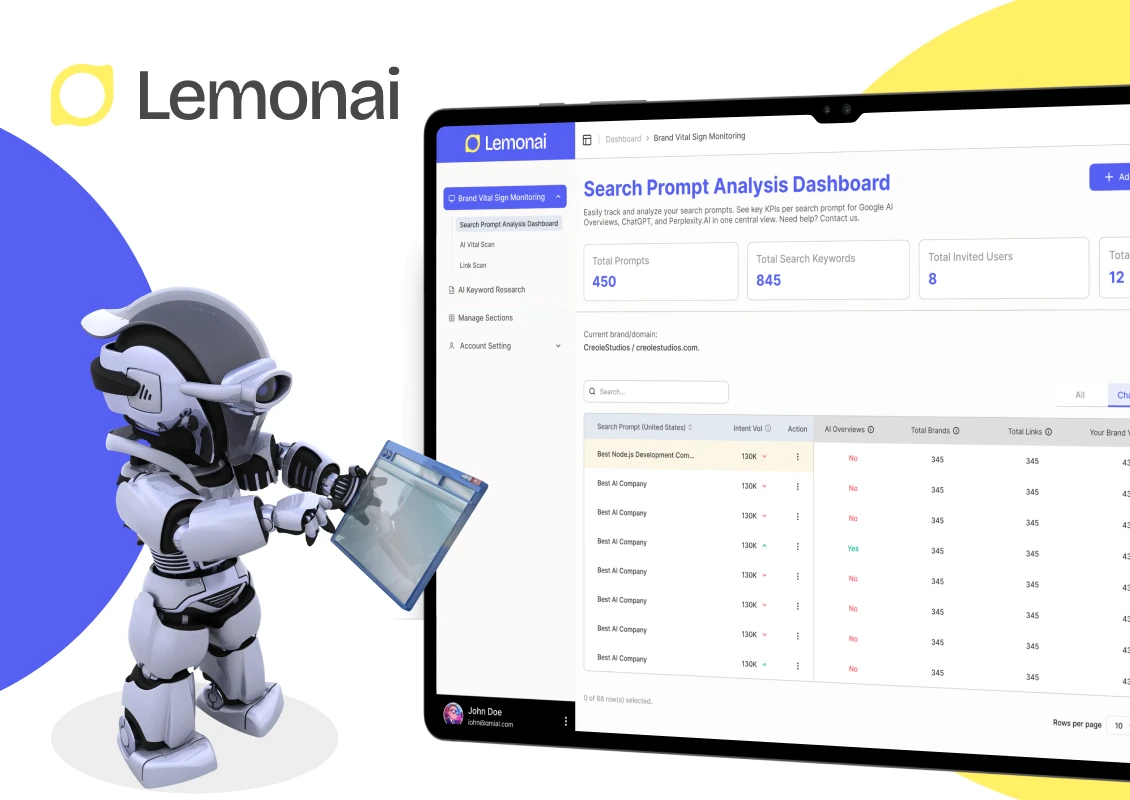
 Hong Kong
 United Kingdom





 Love we get from the world