

 Lets Talk
Web application testing is the process of checking a browser-based application for functional defects, broken integrations, security weaknesses, performance bottlenecks, accessibility barriers, and inconsistent behavior across devices. A reliable strategy combines automated checks with manual exploration and validates the application from individual components through complete user journeys before and after release.
TL;DR
- Test critical user journeys first, not every screen with equal priority.
- Cover functionality, APIs, data, security, performance, accessibility, compatibility, and regression.
- Automate stable, repeatable checks while retaining manual exploratory and usability testing.
- Use production-like environments, controlled data, and clear release criteria.
- Continue testing after launch through monitoring and regression coverage.
What Is Web Application Testing?
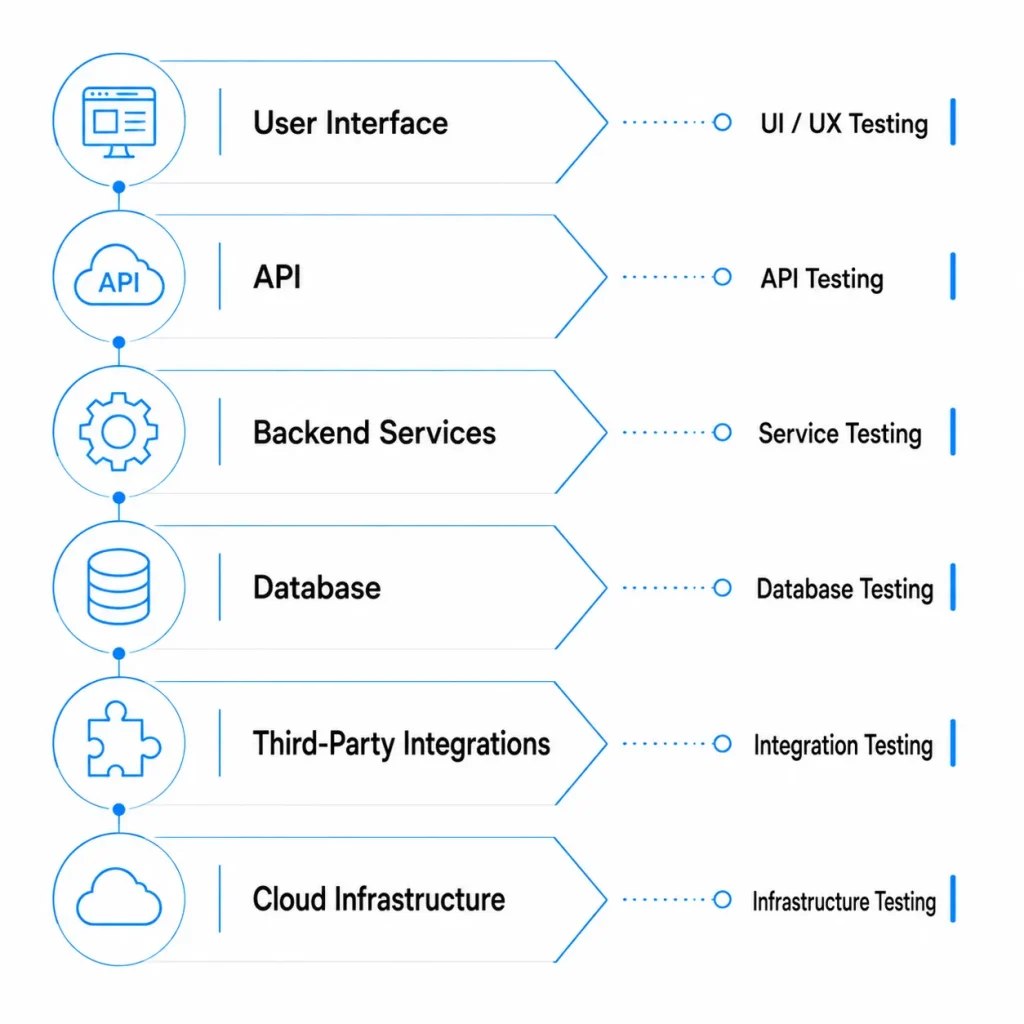
Web application testing verifies that a web-based product works correctly for its intended users, workflows, browsers, devices, integrations, and operating conditions. It covers functional behavior, such as whether a payment succeeds, and non-functional quality, such as security, accessibility, performance, and reliability.
A web application may include a browser interface, backend services, APIs, databases, authentication, third-party services, background jobs, and cloud infrastructure. Testing only the visible interface can miss failures in data processing, permissions, integrations, or recovery behavior.
Effective testing validates each layer and then checks complete end-to-end journeys. This quality model should remain aligned with the wider web application development process.
Website Testing vs Web Application Testing
| Area | Website Testing | Web Application Testing |
| Main focus | Content, navigation, forms, responsiveness | Workflows, data, roles, APIs, integrations |
| User interaction | Usually limited | Often complex and state-based |
| Data processing | Minimal | Frequent transactions and updates |
| Security scope | Forms, CMS, cookies, headers | Authentication, authorization, APIs, business logic |
| Examples | Blog, portfolio, marketing site | SaaS platform, dashboard, portal, booking system |
Why Is Web Application Testing Important?
Testing helps teams find defects before users do and gives product owners evidence that important workflows meet agreed acceptance criteria.
A structured web application testing process helps teams:
- Protect revenue-critical registration, checkout, payment, and subscription journeys
- Prevent users from accessing data outside their permissions
- Detect broken APIs and third-party integrations
- Reduce the risk of existing features breaking after an update
- Identify performance bottlenecks before traffic increases
- Improve keyboard, screen-reader, zoom, and form usability
- Make release decisions using evidence instead of assumptions
Testing works best when requirements, risks, acceptance criteria, and testability are discussed before implementation, not only during final QA.
What Are the Main Types of Web Application Testing?
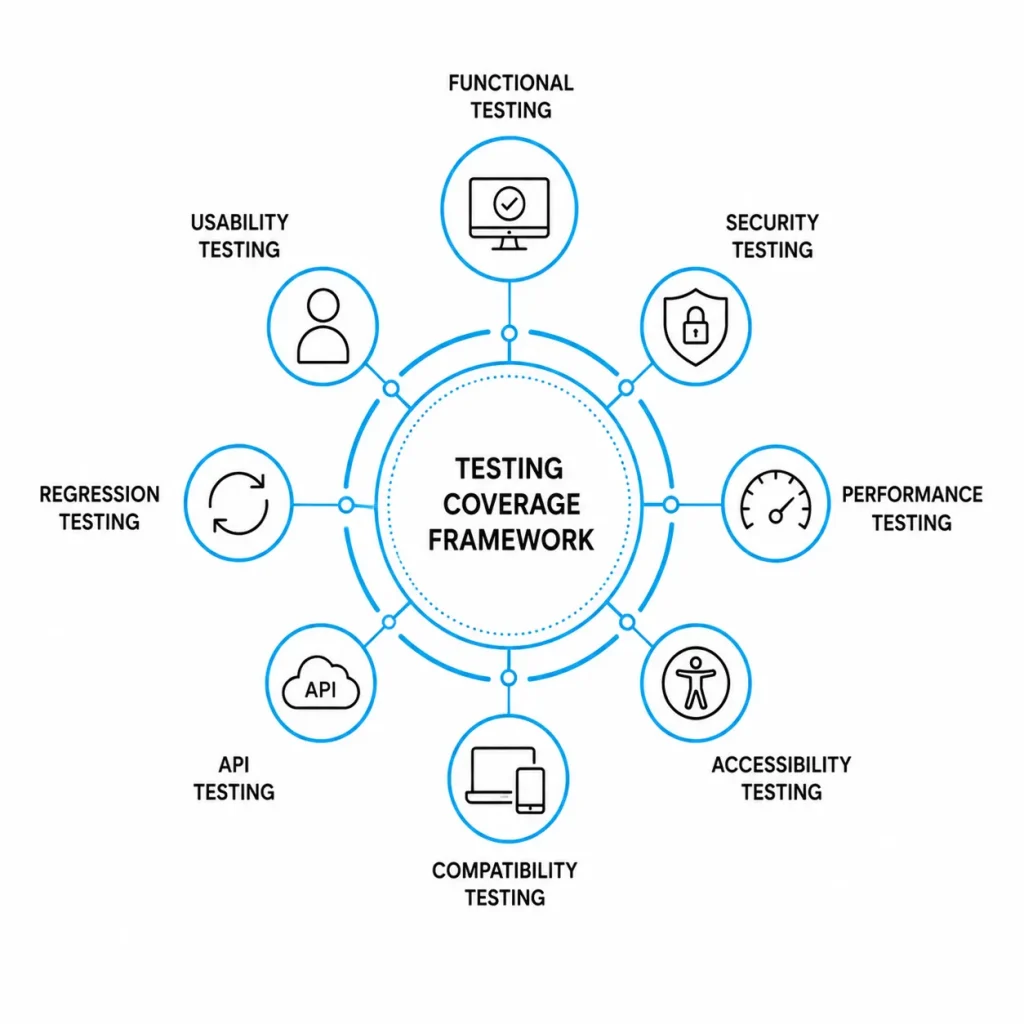
The right testing mix depends on user roles, integrations, traffic, data sensitivity, technical complexity, and release frequency.
| Testing Type | What It Validates | Practical Example |
| Functional testing | Features meet requirements | A submitted form creates the correct record |
| API and integration testing | Services exchange correct data | A payment webhook updates a subscription |
| Database testing | Data is stored and retrieved correctly | Account deletion follows retention rules |
| Usability testing | Users can complete tasks clearly | A new customer completes onboarding |
| Accessibility testing | People with disabilities can use the application | Controls work by keyboard and have accessible names |
| Compatibility testing | Behavior across browsers and devices | A dashboard works on Safari and mobile |
| Performance testing | Speed and stability under load | Search remains responsive during peak traffic |
| Security testing | Controls resist misuse | A standard user cannot access an administrator endpoint |
| Regression testing | Existing features continue working | A pricing update does not break checkout |
| Visual testing | Layout remains consistent | Text does not overlap on smaller screens |
| Recovery testing | Failures are handled safely | A timed-out request does not create duplicate data |
Security testing should reflect the application’s threat model. The OWASP Web Security Testing Guide covers authentication, authorization, session management, input validation, business logic, APIs, and other important security testing areas.
Teams can also use this web application security guide to connect testing findings with practical remediation steps.
Accessibility testing should combine automated scans with manual keyboard, zoom, focus, screen-reader, and user-journey testing. W3C recommends WCAG 2.2 for current accessibility work.
This guide to accessibility testing tools can help teams select appropriate automated and manual testing tools.
How Do You Test a Web Application Step by Step?
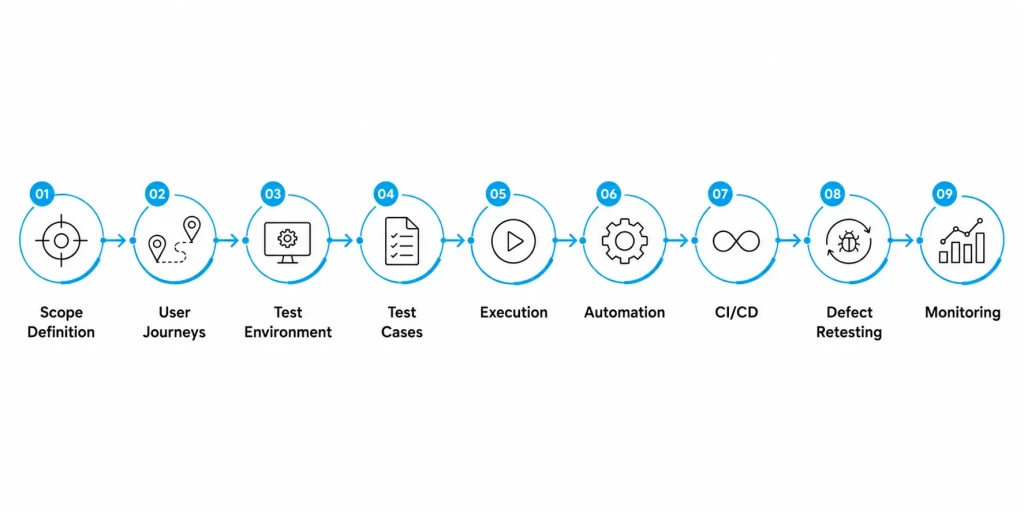
1. Define Scope, Risks, and Release Criteria
List the features included in the release, affected user roles, integrations, supported browsers, target devices, data sensitivity, and expected traffic.
Rank possible failures by their impact. A failed password reset may block account access. A permission defect may expose customer data. A delayed analytics event may have lower immediate impact.
Define release criteria such as:
- No unresolved critical defects
- All priority user journeys passed
- Required browser and device coverage completed
- Security findings reviewed and fixed or formally accepted
- Performance targets met
- Monitoring and rollback plans confirmed
2. Map Critical User Journeys
Turn product requirements into complete workflows, such as:
- Register, verify email, sign in, and recover a password
- Create, approve, edit, and archive a record
- Upgrade a subscription and confirm payment
- Upload a file, process it, and download the result
- Invite a team member and assign a role
Test both normal and negative paths. Negative scenarios may include invalid input, duplicate actions, expired sessions, permission failures, interrupted networks, and unavailable third-party services.
3. Prepare the Environment and Test Data
Use a testing environment that is close enough to production to expose configuration, database, caching, integration, and infrastructure issues.
Create accounts for every relevant role and prepare data covering:
- Valid, invalid, empty, and duplicate values
- Minimum and maximum boundary values
- Different account and subscription states
- Time zones, currencies, languages, and date formats
- Large files or high-volume records
- Privacy, consent, deletion, and retention scenarios
Avoid sharing one mutable account across many automated tests. Shared data can make test failures unpredictable and difficult to reproduce.
4. Write Clear Test Cases
Each test should define the precondition, action, test data, and expected result.
| Field | Example |
| Scenario | Manager approves an expense request |
| Preconditions | Request is pending and manager is authorized |
| Steps | Sign in, open the request, select Approve |
| Expected result | Status changes, audit entry is created, requester is notified |
| Negative test | Unrelated employee attempts approval |
| Expected result | Access is denied and no data changes |
Prioritize test cases according to business impact and failure likelihood, not only by the number of available features.
5. Test Individual Layers and Full Journeys
Use unit tests for isolated logic, integration tests for connected components, API tests for contracts and permissions, and end-to-end tests for critical user journeys.
A practical testing sequence is:
- Validate calculations and business rules
- Validate database operations and service integrations
- Validate API schemas, status codes, authorization, and errors
- Validate browser workflows and visible feedback
- Validate background jobs, notifications, webhooks, and asynchronous processing
- Validate the complete business outcome from beginning to end
Testing at several layers makes defects easier to diagnose than relying entirely on browser automation.
6. Test Non-Functional Quality
Check areas that affect the quality and reliability of the application beyond basic feature behavior:
- Security and authorization
- Load, stress, and endurance
- Accessibility and keyboard behavior
- Browser and device compatibility
- Error handling and recovery
- Logging, alerts, and audit trails
- Backups and rollback processes
For performance testing, combine controlled laboratory testing during development with real-user monitoring after release. Google’s Web Vitals guidance distinguishes lab data from field data collected from actual user experiences.
7. Automate Stable and Repeatable Tests
Good automation candidates include:
- API contract tests
- Authentication and permission regression
- Checkout and subscription journeys
- Data validation rules
- Cross-browser smoke tests
- Frequently repeated critical workflows
Avoid automating unstable functionality too early. Frequently changing selectors and workflows create maintenance work without producing dependable coverage.
Modern end-to-end frameworks such as Playwright can run tests across Chromium, Firefox, and WebKit. Reliable browser tests should use user-facing locators, isolated test state, and assertions that wait for expected browser behavior.
8. Integrate Testing Into CI/CD
Run fast tests on every pull request, broader integration tests before merging, and targeted end-to-end, security, or performance suites before release.
A practical pipeline may include:
- Static analysis and unit testing
- API and integration testing
- Deployment to a testing environment
- Smoke and end-to-end testing
- Security and dependency scanning
- Release approval based on results
Keep fast release gates separate from slower scheduled testing. A large and unreliable test suite should not become the only deployment control.
9. Triage Defects, Retest, and Monitor
Every defect report should contain enough information for another person to reproduce the problem:
- Environment and application version
- User role and test data
- Reproduction steps
- Expected and actual behavior
- Screenshots, recordings, logs, and request IDs
- Browser and device details
- Severity, priority, owner, and status
After a fix, retest the defect and related workflows.
In production, monitor application errors, API latency, failed jobs, unusual behavior, and user-impacting incidents. Convert recurring production failures into regression tests where practical. See how application monitoring with Sentry can support post-release visibility.
Why Should Testing Cover System Boundaries?
Some of the most serious web application defects occur between connected components rather than within a single screen.
For example, a payment may be completed successfully while the customer’s subscription remains unchanged. A file may upload correctly while its background processing job fails. A user role may appear updated in the interface without the corresponding API permissions being applied.
Testing should therefore validate the complete outcome across:
- User interface feedback
- API responses
- Database changes
- Notifications
- Audit records
- Failure handling and recovery
This end-to-end approach provides stronger release evidence than checking only what appears in the browser.
Practical Example: AlertZY Testing a Monitoring Application
A server-monitoring application may include secure server onboarding, multi-server management, real-time metrics, dashboards, authentication, administrative controls, and an AI-powered assistant.
Testing this type of application should cover:
- Accuracy and freshness of monitoring data
- Isolation of data between servers and accounts
- Role-based access controls
- Accuracy and reliability of AI-generated responses
- Performance during high query volumes
- Responsive behavior across devices
- Recovery from disconnected or unavailable servers
In the AlertZy project, testing included real-time server query validation, chatbot response checks, stress testing, and responsive interface testing. This helped verify the complete monitoring workflow rather than only confirming that the dashboard loaded correctly.
Manual Testing vs Automated Testing
Manual and automated testing solve different problems. A reliable web application testing strategy normally uses both.
| Manual Testing Is Best For | Automated Testing Is Best For |
| Exploration and unexpected behavior | Repeated regression checks |
| Usability and content clarity | API and data validation |
| New or changing features | Stable critical journeys |
| Visual judgment | Cross-browser smoke tests |
| Assistive-technology testing | CI/CD release gates |
| Investigating complex failures | Repetitive data combinations |
Manual testing is strongest when human judgment, investigation, and observation matter. Automation is strongest when the same expected behavior must be checked frequently and consistently.
Which Web Application Testing Tools Should You Use?
Choose tools based on the testing problem, application stack, team skills, integration requirements, and long-term maintenance cost.
| Purpose | Tool Options |
| Unit and component testing | Jest, Vitest, Pytest, JUnit |
| Browser and end-to-end testing | Playwright, Cypress, Selenium |
| API testing | Postman and Newman, Playwright, REST Assured |
| Performance testing | k6, Apache JMeter, Lighthouse, WebPageTest |
| Security testing | OWASP ZAP, Burp Suite, dependency scanners |
| Accessibility testing | axe, WAVE, Accessibility Insights, NVDA, VoiceOver |
| Cross-browser testing | BrowserStack, LambdaTest, Playwright projects |
| Error and performance monitoring | Sentry, Datadog, Grafana, Prometheus |
A large toolset does not guarantee meaningful coverage. Start with a maintainable stack that protects the application’s highest-risk workflows.
What Are the Best Practices for Web Application Testing?
Prioritize Risk
Focus first on permissions, payments, personal data, integrations, and workflows whose failure could create serious business or user consequences.
Test Early and After Release
Review testability before coding, validate functionality during development, test integrations in staging, and continue monitoring after release.
Control Test Data
Create, isolate, and clean up data predictably. Shared and frequently changing data is a common cause of unreliable tests.
Include Negative Scenarios
Test unauthorized actions, invalid state transitions, duplicate submissions, expired tokens, interrupted networks, oversized inputs, and unavailable dependencies.
Use Stable Automation Selectors
Prefer accessible roles, labels, visible text, and explicit test identifiers over fragile selectors based on page layout.
Treat Flaky Tests as Defects
Investigate timing problems, leaked state, data collisions, unstable environments, and unreliable third-party dependencies.
Measure Coverage Against Risks
Track coverage of critical journeys, user roles, integrations, browsers, security controls, and failure modes. Code coverage alone does not prove that the application works correctly for users.
Pre-Release Web Application Testing Checklist
Functional and Workflow Testing
- Critical user journeys pass
- Forms handle valid, invalid, empty, and boundary inputs
- Role permissions match requirements
- Notifications, webhooks, and background jobs complete correctly
- Errors explain what happened and what users should do next
Data and Integration Testing
- Create, update, search, export, and delete actions preserve data integrity
- Third-party integrations handle success, timeout, retry, and failure
- Duplicate requests do not create duplicate transactions
- Time zones, currencies, dates, and locales display correctly
- Audit logs capture required actions
Security Testing
- Authentication, session expiry, logout, and account recovery work
- Authorization is tested at both interface and API levels
- Sensitive information is not exposed in URLs, logs, or error messages
- Input validation and security headers are reviewed
- Dependencies and secrets are scanned
Experience and Accessibility Testing
- Keyboard navigation and visible focus work
- Labels, instructions, errors, and status messages are clear
- Zoom and responsive layouts remain usable
- Screen-reader testing covers priority journeys
- Supported browsers and devices are verified
Performance and Release Readiness
- Important pages and actions meet agreed response targets
- Expected load and failure scenarios are tested
- Monitoring and alerts are active
- Backups, recovery, rollback, and support ownership are confirmed
- No unresolved critical defects remain
Conclusion
Web application testing is not a final-stage activity. It should be integrated throughout planning, development, deployment, and post-release monitoring. A balanced approach that combines functional, security, performance, accessibility, compatibility, and regression testing helps teams identify risks earlier and release them with greater confidence.
The most effective testing strategies focus on critical user journeys, validate complete system outcomes, and use automation where it delivers reliable, repeatable coverage. Manual testing should continue to support exploratory testing, usability evaluation, accessibility reviews, and complex real-world scenarios.
For businesses planning a new product or improving an existing platform, working with an experienced web application development company can help ensure that quality assurance, security, scalability, and testing are considered throughout the development lifecycle.
Frequently Asked Questions
What is web application testing?
Web application testing is the process of validating a browser-based application’s functionality, integrations, data handling, security, performance, accessibility, compatibility, and user experience.
How do you manually test a web application?
Start with critical user journeys and written acceptance criteria. Test normal, invalid, boundary, permission, interruption, browser, device, and accessibility scenarios. Record the test data, expected result, actual result, and evidence for each defect.
What are the main types of web application testing?
The main types include functional, API, integration, database, usability, accessibility, compatibility, performance, security, regression, visual, and recovery testing.
Can automated testing replace manual testing?
No. Automation is suitable for stable and repeatable checks. Manual testing remains necessary for exploration, usability, visual judgment, assistive-technology testing, and unexpected user behavior.
How often should a web application be tested?
Test during development, before every significant release, after major infrastructure or integration changes, and continuously after launch through monitoring and regression testing.
What should be tested first in a web application?
Start with journeys whose failure would create the greatest business, security, compliance, or user impact. These commonly include authentication, permissions, payments, data updates, and integrations.










 30 mins free Consulting
 8 min read

 Canada
 Hong Kong
 United Kingdom





 Love we get from the world