
 Lets Talk
Elderly care app development typically costs $40,000 to $70,000 for a focused MVP, $70,000 to $140,000 for a production-ready care platform, and $140,000 to $300,000 or more for an advanced solution with wearables, telehealth, clinical integrations, or AI. A practical first version usually takes three to five months. The final budget depends on user roles, accessibility, emergency workflows, data sensitivity, integrations, platforms, and regulatory scope.
TL;DR
- A focused elderly care app MVP generally costs $40,000 to $70,000 and takes three to five months.
- A multi-role senior care platform may cost $70,000 to $140,000 and take five to nine months.
- Wearables, telehealth, AI, EHR connectivity, and multi-location operations can push the budget above $140,000.
- Accessibility, caregiver permissions, alert logic, security, and real-user testing are core requirements.
- HIPAA does not automatically apply to every health app. Applicability depends on the product and its data relationships.
- Validate one care workflow before expanding into a complete care ecosystem.
What Is Elderly Care App Development?
Elderly care app development is the process of designing and building digital products for older adults, family members, professional caregivers, care facilities, and healthcare providers.
An app may focus on one need, such as medication reminders, or combine several workflows:
- Daily wellness and mood check-ins
- Medication and appointment reminders
- Family communication and video calling
- Caregiver tasks and visit records
- Emergency alerts and escalation
- Remote monitoring through connected devices
The need for usable senior-care technology is growing. The World Health Organization projects that the global population aged 60 and above will reach 2.1 billion by 2050. Adoption, however, depends on whether the product fits the physical, cognitive, emotional, and technical realities of older users.
Link this supporting article to the main healthcare software development company page to strengthen the topic cluster.
How Much Does an Elderly Care App Cost?
The following figures are planning ranges, not fixed quotations.
| Product scope | Estimated cost | Timeline | Example scope |
| Prototype and validation | $8,000 to $20,000 | 3 to 6 weeks | User flows, prototype, accessibility tests, integration proof of concept |
| Focused MVP | $40,000 to $70,000 | 3 to 5 months | Senior app, caregiver access, reminders, check-ins, alerts, admin |
| Production-ready platform | $70,000 to $140,000 | 5 to 9 months | Multiple roles, scheduling, secure messaging, video, reports |
| Advanced or enterprise platform | $140,000 to $300,000+ | 9 to 18+ months | Wearables, EHRs, telehealth, AI, multi-location operations |
These ranges align with the broader cost profile of compliance-sensitive healthcare products. For related benchmarks, see the healthcare app development cost guide.
A Practical MVP Cost Example
Consider an app for seniors living independently with onboarding, daily check-ins, medication reminders, missed-activity alerts, family access, role-based permissions, notifications, an admin panel, and basic analytics.
A realistic planning budget would be $45,000 to $65,000, depending on platforms, design depth, notification logic, security, and whether regulated health data is involved.
Estimate Your Elderly Care App Cost
Select your required features, platforms, integrations, and project complexity to get a personalized development cost estimate in minutes.
Which Features Should the App Include?
The correct feature set depends on who receives care, who provides support, and what should happen when something goes wrong.
| User | MVP features |
| Older adult | Assisted onboarding, reminders, wellness check-in, one-tap communication, emergency help |
| Family or caregiver | Care overview, alerts, reminder management, notes, escalation contacts |
| Administrator | User roles, templates, activity logs, support tools, basic reporting |
Advanced features may include telehealth, wearables, fall detection, Bluetooth health devices, voice assistance, multilingual support, care plans, EHR integration, payments, and AI-supported summaries.
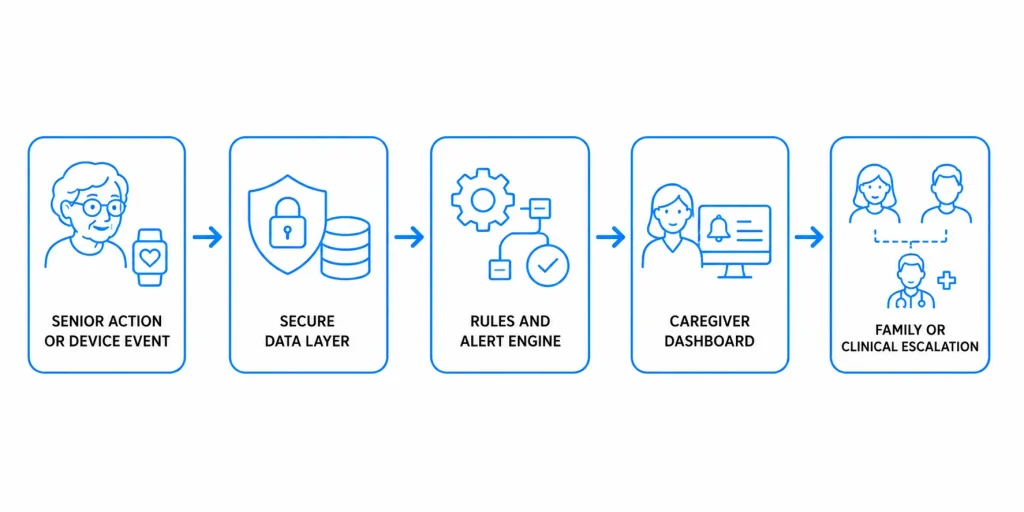
AI-generated alerts should support human decisions, not silently replace clinical judgment. Every alert needs an owner, severity level, response time, and fallback process.
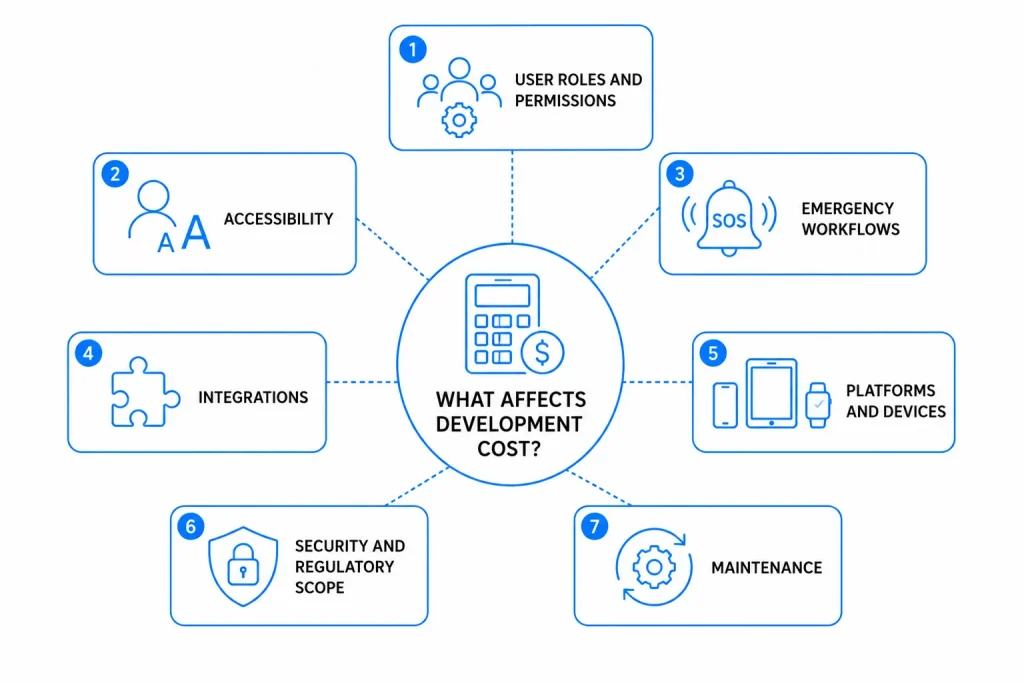
What Affects Development Cost?
1. User Roles and Permissions
A senior, relative, caregiver, nurse, facility manager, and administrator each need different screens, permissions, notifications, and test cases.
2. Accessibility
Senior-friendly design requires readable text, strong contrast, large touch targets, plain language, simple navigation, and clear error recovery. The W3C guidance for older users explains how age-related needs overlap with established accessibility standards.
3. Emergency Workflows
An SOS feature must define recipients, escalation order, response time, location sharing, false-alarm handling, logs, and fallback behavior.
4. Integrations
Video, SMS, maps, wearables, EHRs, pharmacies, payments, and care-management systems add API work, vendor constraints, testing, and ongoing fees.
5. Platforms and Devices
The product may need phones, tablets, web dashboards, smartwatches, kiosks, or managed devices. Older hardware, offline use, and weak connectivity increase testing effort.
6. Security and Regulatory Scope
Encryption, authentication, consent, audit logs, monitoring, backups, retention rules, and incident response require specialized engineering and review.
7. Maintenance
Plan for hosting, support, accessibility fixes, operating-system updates, third-party services, monitoring, and security maintenance. A useful planning allowance is 15% to 25% of the initial build cost per year, depending on product complexity and support expectations.
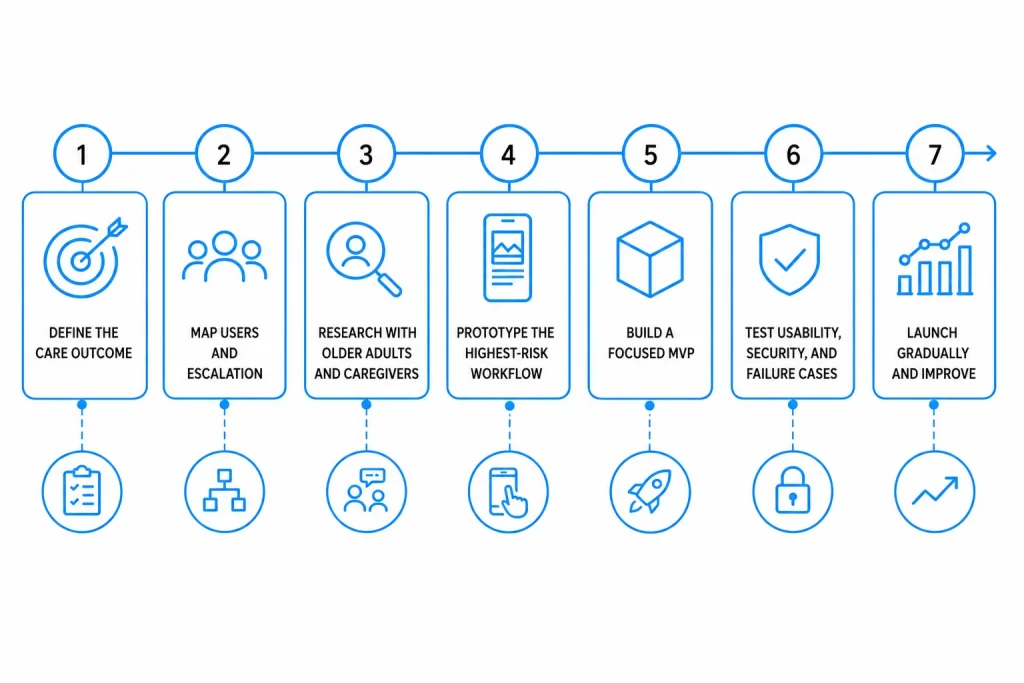
How Do You Develop a Senior Care App?
Step 1: Define the Care Outcome
“Support seniors” is too broad. “Notify a family caregiver within 15 minutes of a missed daily check-in” is measurable.
Step 2: Map Users and Escalation
Document who can view, edit, acknowledge, or share each type of information. Define what happens after missed reminders, abnormal readings, or emergency events.
Step 3: Research With Older Adults and Caregivers
Include users with different levels of digital confidence, vision, dexterity, language, and caregiver support.
Step 4: Prototype the Highest-Risk Workflow
Test onboarding, check-ins, medication confirmation, or SOS before developing the full product.
Step 5: Build a Focused MVP
A healthcare MVP should be narrow but reliable. Use the MVP development cost guide to compare validation, design, engineering, testing, and post-launch spending.
Step 6: Test Usability, Security, and Failure Cases
Test slow networks, denied permissions, missed alerts, duplicate notifications, expired sessions, unavailable caregivers, and device changes.
Step 7: Launch Gradually
Begin with a controlled user group. Track activation, successful check-ins, reminder completion, alert response time, support requests, retention, and task failures.
How Should Accessibility, Security, and Compliance Be Handled?
Accessibility
Use readable typography, strong contrast, generous spacing, obvious actions, minimal navigation depth, and plain language. Support text scaling, screen readers, captions, reduced motion, and assisted onboarding.
Security
A practical baseline includes encryption, role-based access, secure authentication, session controls, audit logging, backup and recovery, vulnerability management, data minimization, and access revocation.
Compliance
Do not claim that every elderly healthcare app must be “HIPAA compliant.” In the United States, applicability depends on whether the app works with covered entities, business associates, and protected health information. The HHS mobile health app resources help developers assess which federal rules may apply.
Other markets may require GDPR, local health-data rules, accessibility standards, data residency, consumer-protection compliance, or medical-device review. Obtain qualified legal and regulatory advice for the intended use and launch regions.
How Can You Control the Budget?
- Start with one care outcome and one primary user journey.
- Defer AI, wearables, and EHR integration until the core workflow is validated.
- Prototype emergency and accessibility flows before engineering.
- Use established authentication, video, notification, and monitoring services.
- Define acceptance criteria for alerts, permissions, and offline behavior.
- Launch with a small facility, caregiver group, or pilot cohort.
- Prioritize reliability over a large feature list.
Plan Your App Budget
Use this free budget planner to organize your feature priorities, development costs, and project investment before starting elderly care app development.

A cheaper build that confuses seniors or misses alerts is not cost-efficient. Savings should come from scope discipline and early validation, not from removing essential safety, accessibility, or security work.
What Can Teams Learn From a Real Project?
First-Hand Experience: DigiHappy
Creole Studios developed the DigiHappy video-calling platform for seniors for iOS and Android. The published case study reports a $50,000+ budget and a 1.5-year phased engagement.
The project shows why senior care app development extends beyond standard mobile UI:
- Auto-answer supported users who struggled to operate devices.
- Large controls, high contrast, and simple navigation were tested with seniors.
- English, Swedish, and Finnish interfaces supported a wider user base.
- Remote device management allowed support without physical access.
- Live video, backend scalability, cloud monitoring, and continuous delivery required coordinated mobile, backend, design, and QA work.
Practical lesson: Remote support, fallback behavior, device management, and assisted onboarding may create more value than another dashboard or an unvalidated AI feature.
Which Technology Stack Is Suitable?
| Layer | Common options | Key consideration |
| Mobile | Flutter, React Native, Swift, Kotlin | Devices, accessibility, performance |
| Dashboard | React, Angular, Vue | Roles, reporting, responsive access |
| Backend | Node.js, .NET, Java, Python, Go | Security, scale, integrations |
| Database | PostgreSQL or managed relational services | Integrity, reporting, retention |
| Communication | WebSockets, WebRTC, managed video APIs | Reliability and call controls |
| Cloud | AWS, Azure, Google Cloud | Regions, monitoring, security |
| Health data | FHIR or vendor APIs | Mapping, authentication, test environments |
Choose technology after defining workflows, devices, launch markets, offline needs, and integrations. A familiar, maintainable stack is usually safer than an experimental stack selected for novelty.
Conclusion
Elderly care app development requires a careful balance of usability, accessibility, safety, privacy, and operational reliability. A focused MVP generally costs $40,000 to $70,000, while multi-role and integration-heavy platforms can range from $70,000 to $300,000 or more.
The strongest starting point is one clearly defined care problem, tested with older adults and caregivers, and supported by dependable escalation, accessibility, and security workflows. Build that workflow well, measure real-world usage, and expand only after the product demonstrates value.
Working with an experienced healthcare software development company can help you define the right feature scope, address healthcare data requirements, and develop a secure, scalable elderly care application.
Frequently Asked Questions
How Much Does Elderly Care App Development Cost?
A focused MVP typically costs $40,000 to $70,000. A production-ready platform may cost $70,000 to $140,000, while an advanced app with wearables, telehealth, AI, or EHR integration can cost $140,000 to $300,000 or more.
How Long Does Senior Care App Development Take?
A focused MVP usually takes three to five months. A multi-role platform may take five to nine months. Enterprise products with complex devices or integrations can take nine to 18 months or longer.
What Should an Elderly Care App MVP Include?
A practical MVP may include onboarding, daily check-ins, medication reminders, caregiver access, missed-activity alerts, emergency contacts, notifications, permissions, an admin panel, and basic analytics.
Is Every Elderly Healthcare App Required to Comply With HIPAA?
No. HIPAA applicability depends on the app’s role, relationships, and data flows. Other privacy, consumer-protection, state, or medical-device rules may apply.
Can the App Connect to Wearables and Fall Detectors?
Yes. Integration can use vendor APIs, Bluetooth, or health-data platforms. Cost depends on device reliability, background operation, data access, alert logic, and validation.
How Can the App Be Made Easier for Seniors to Use?
Use large touch targets, readable text, strong contrast, short task flows, plain language, assisted onboarding, clear feedback, and testing with representative older adults.









 30 mins free Consulting
 10 min read

 Singapore
 USA
USA 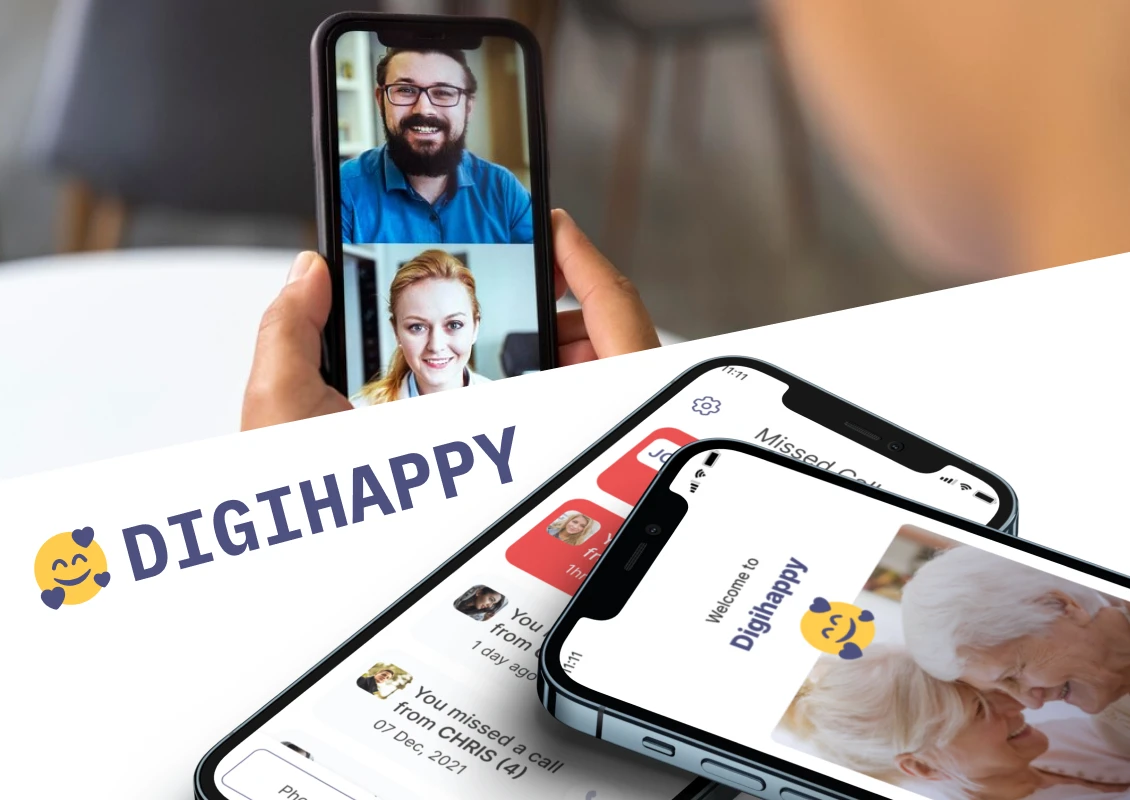
 Finland





 Love we get from the world