
 Lets Talk
Web development is the process of creating, running, and maintaining websites and browser-based applications. It includes the visible interface, server-side functionality, databases, security, testing, deployment, and ongoing maintenance. If you are new to web development, begin with HTML, CSS, and JavaScript, build a small website, learn Git, and then explore frontend or backend development based on your interests.
TL;DR
- Web development turns designs and business requirements into functional websites and web applications.
- Frontend development controls what users see, while backend development handles data and application logic.
- HTML, CSS, and JavaScript are the essential starting technologies.
- Beginners should learn by building small projects rather than studying every framework first.
- Modern websites must also be responsive, accessible, secure, fast, and maintainable.
- A basic website can be built in weeks, while custom web applications may require several months.
What Is Web Development?
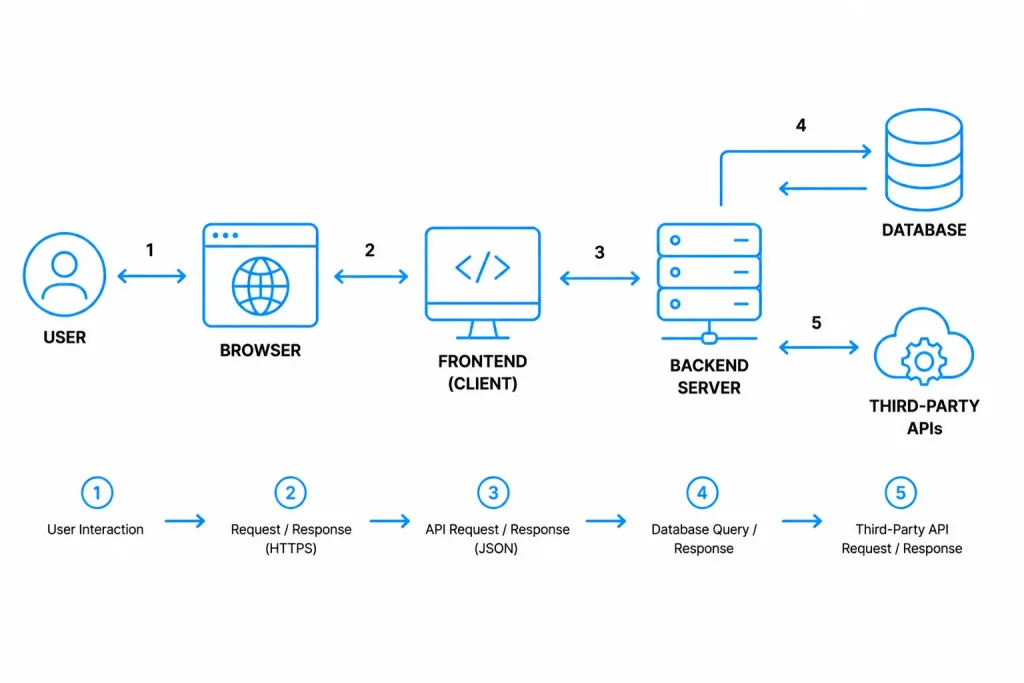
Web development means building and maintaining websites or applications that people access through a web browser. It covers everything from a simple informational page to an e-commerce store, customer portal, SaaS product, or real-time collaboration platform.
A complete web solution usually includes:
- A user interface displayed in the browser
- Application logic that processes user actions
- A database that stores information
- APIs that connect different systems
- Hosting infrastructure that makes the application available
- Security controls that protect users and data
- Monitoring and maintenance after launch
Web development is related to web design, but the two are not identical. Web design focuses primarily on layout, user flows, visual hierarchy, typography, and interaction design. Web development converts those designs and requirements into working software.
For projects involving complex workflows, integrations, or user roles, read our detailed guide to web application development.
How Does a Website Work?
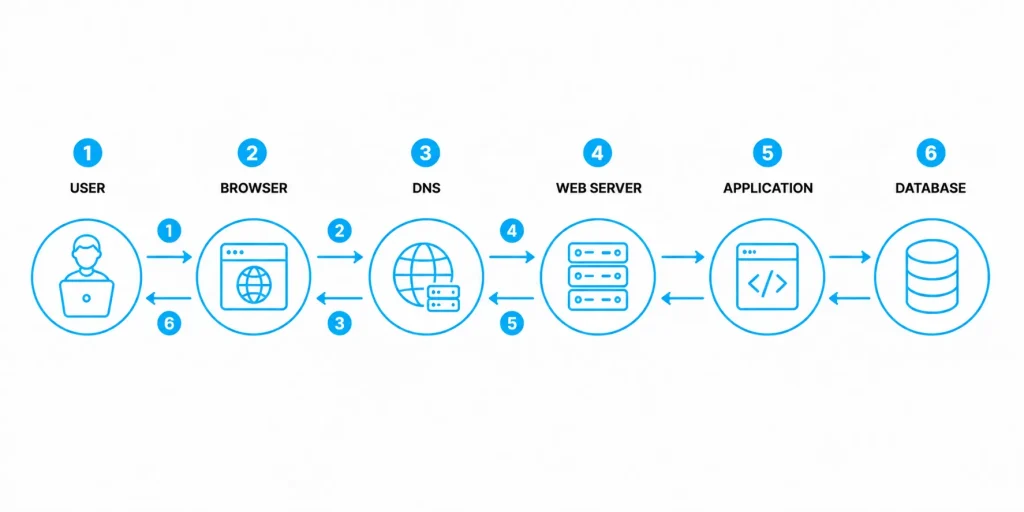
When you enter a website address, the browser requests the relevant resources from a web server. The server returns files or data that the browser uses to display the page.
A simplified request flow looks like this:
- The user enters a URL or selects a link.
- The browser identifies the server associated with the domain.
- The browser sends an HTTP request.
- The server processes the request.
- The server returns HTML, CSS, JavaScript, images, or data.
- The browser assembles the response and renders the page.
- Additional requests may retrieve data as the user interacts with the website.
A static website may return files that are already prepared. A dynamic website generates or retrieves information according to the user, request, permissions, or stored data.
The MDN explanation of how the web works provides an accessible technical introduction to this process.
Suggested original diagram
Exact placement: After “How Does a Website Work?”
Image brief: A six-stage browser request diagram showing user, browser, DNS, web server, application, and database. Use numbered arrows to show request and response flow.
Alt text: How a browser requests website data from a web server and database
What Are the Main Types of Web Development?
Web development is commonly divided into frontend, backend, and full-stack development. Specialized areas such as CMS, e-commerce, and progressive web app development build on these foundations.
Frontend development
Frontend development controls the parts of a website that users see and interact with. This includes navigation, forms, buttons, content layouts, responsive behavior, and interactive components.
Common frontend technologies include:
- HTML for page structure and meaning
- CSS for styling and responsive layouts
- JavaScript for behavior and interactivity
- React, Angular, or Vue for component-based interfaces
Backend development
Backend development handles functionality that usually remains invisible to users. It processes requests, applies business rules, manages authentication, interacts with databases, and connects external services.
Common backend technologies include:
- Node.js and Express
- Python with Django, Flask, or FastAPI
- PHP with Laravel
- Java with Spring Boot
- C# with .NET
- Ruby with Ruby on Rails
Full-stack development
Full-stack development combines frontend and backend work. A full-stack developer can build the interface, create APIs, connect a database, and support deployment.
Full-stack knowledge is useful for prototypes and smaller teams, but larger applications often require specialists in frontend, backend, quality assurance, security, cloud infrastructure, and user experience.
CMS development
A content management system allows authorized users to publish or update content without editing application code. WordPress, Drupal, and headless CMS platforms are common examples.
CMS development is suitable for marketing websites, editorial platforms, documentation portals, and other content-heavy experiences.
E-commerce development
E-commerce development includes product catalogs, search, shopping carts, payment gateways, order management, inventory integration, promotions, and customer accounts.
Progressive web app development
A progressive web app uses modern browser capabilities to provide an app-like experience. Depending on the implementation and browser support, it may include installation, offline functionality, caching, and push notifications.
Learn more about progressive web app development and when a PWA is appropriate.
Frontend vs Backend Development
| Area | Frontend development | Backend development |
| Primary focus | Interface and user experience | Data, logic, and system operations |
| Runs mainly in | Web browser | Server or cloud environment |
| Core technologies | HTML, CSS, JavaScript | Node.js, Python, PHP, Java, .NET |
| Common responsibilities | Layouts, forms, interactions, responsiveness | Authentication, APIs, permissions, database operations |
| Typical output | Pages and interactive components | Services, APIs, workflows, and data |
| Key concerns | Accessibility, browser compatibility, usability | Security, reliability, scalability, data integrity |
Frontend and backend development are complementary. A polished interface cannot complete a transaction without supporting backend logic, while a powerful backend is difficult to use without a clear interface.
Which Web Development Technologies Should You Learn?
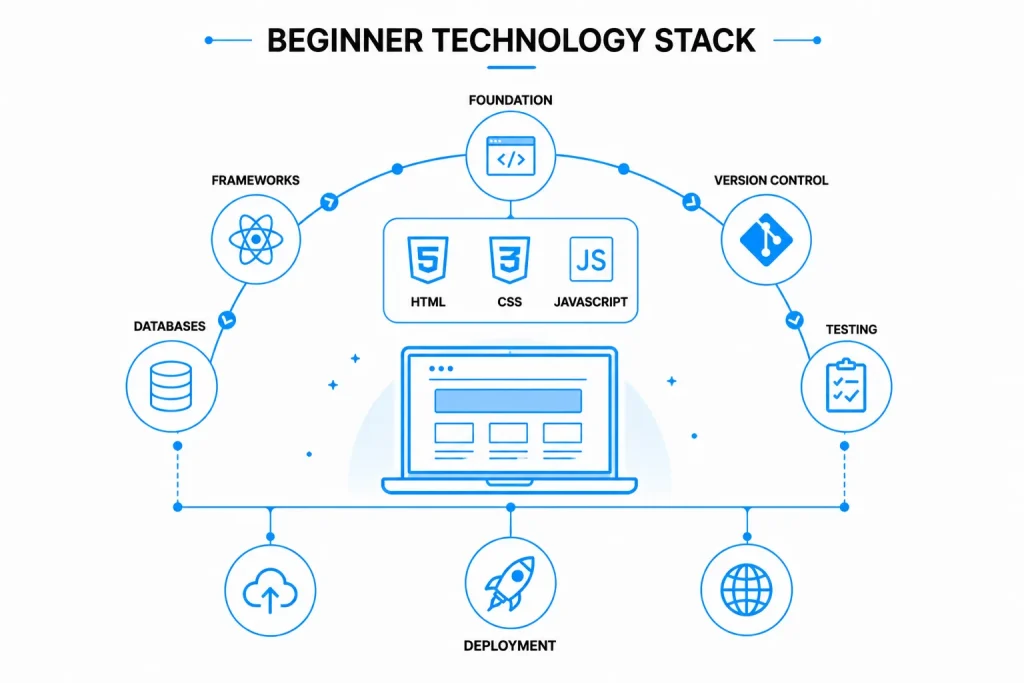
A beginner does not need to learn every web development language or framework. Start with the browser fundamentals and expand only when a project requires additional capabilities.
HTML
HTML defines the structure and meaning of web content. It identifies headings, paragraphs, links, images, navigation, forms, and other page elements.
Semantic HTML also helps browsers, search engines, and assistive technologies understand the purpose of the content.
CSS
CSS controls visual presentation, including:
- Colors and typography
- Spacing and alignment
- Grid and flexbox layouts
- Responsive behavior
- Transitions and animations
A beginner should understand the box model, selectors, positioning, flexbox, grid, media queries, and responsive units before relying heavily on CSS frameworks.
JavaScript
JavaScript adds behavior to a page. It can validate forms, update content without reloading, communicate with APIs, manage application state, and create interactive interfaces.
The MDN web development curriculum provides structured modules covering these core technologies.
Frameworks and libraries
Frameworks provide established patterns, reusable components, routing, state management, and other development capabilities. Popular examples include React, Angular, Vue, Next.js, Django, Laravel, and Spring Boot.
Choose a framework based on:
- Product requirements
- Team experience
- Performance needs
- Ecosystem maturity
- Security support
- Hiring availability
- Long-term maintainability
Do not select a framework only because it is currently popular. A simple content website may not require the same architecture as a multi-tenant SaaS application.
Databases
Databases store information such as user profiles, transactions, products, permissions, and application settings.
Relational databases, including PostgreSQL and MySQL, organize structured data into related tables. NoSQL databases, including MongoDB, provide different models that may suit flexible or high-volume data requirements.
Development and deployment tools
Modern developers also use:
- Git for version control
- GitHub, GitLab, or Bitbucket for collaboration
- Package managers such as npm
- Browser developer tools
- API testing tools
- CI/CD pipelines
- Cloud hosting platforms
- Logging and monitoring systems
What Are the Seven Steps of Web Development?
A reliable web development process connects business goals to design, engineering, testing, and measurable post-launch outcomes.
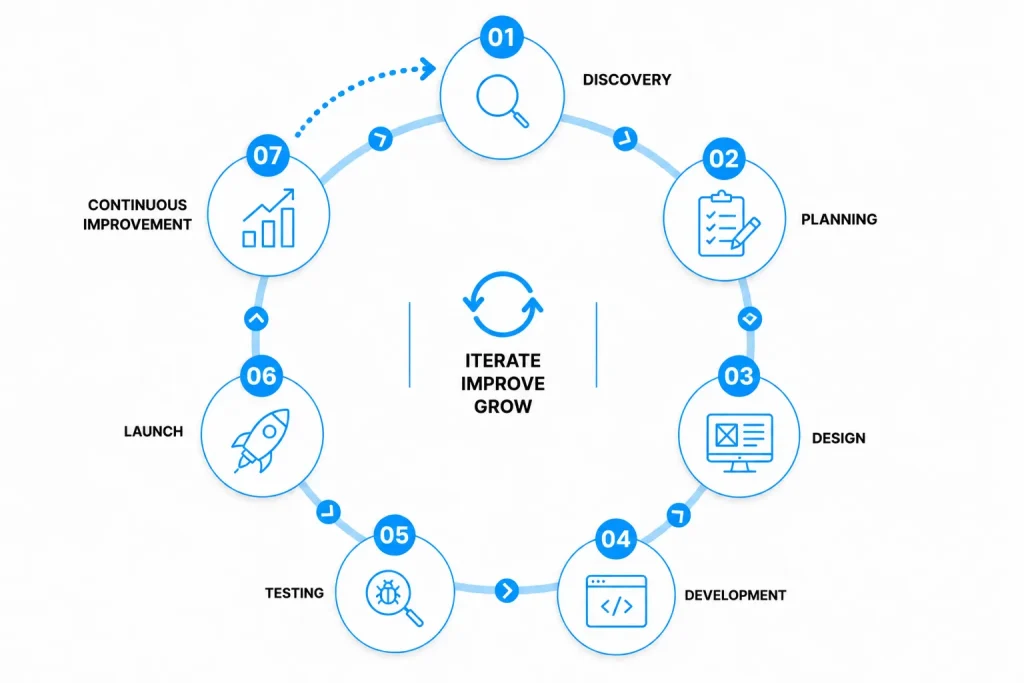
1. Discovery and requirements
Define the audience, business objective, user problems, functional requirements, integrations, content needs, constraints, and success metrics.
The output should be a prioritized scope rather than an unstructured feature list.
2. Information architecture and planning
Organize pages, navigation, data entities, user roles, workflows, and technical dependencies. Decide what belongs in the first release and what can wait.
3. UX and interface design
Create user flows, wireframes, prototypes, and interface designs. Validate important interactions before investing heavily in development.
4. Frontend and backend development
Build the interface, application logic, database structure, APIs, authentication, and integrations. Developers should use version control and review code throughout the process.
5. Testing and quality assurance
Test functionality, responsiveness, browser compatibility, accessibility, performance, security, and failure conditions.
Security should not be treated as a final checklist. The OWASP Top 10 identifies major categories of web application security risk that teams should consider during design and development.
6. Deployment and launch
Prepare the production environment, configure the domain and HTTPS, migrate data, establish backups, run final checks, and release the website.
For high-risk applications, use a rollback plan so the team can restore the previous version if a serious problem occurs.
7. Monitoring and continuous improvement
After launch, monitor uptime, errors, performance, security events, user behavior, and conversion metrics. Maintenance may include dependency updates, vulnerability remediation, content updates, bug fixes, and feature improvements.
Get the Beginner Web Development Roadmap
Follow a practical 12-week roadmap covering HTML, CSS, JavaScript, Git, testing, deployment, and portfolio development.

How Can Beginners Start Web Development?
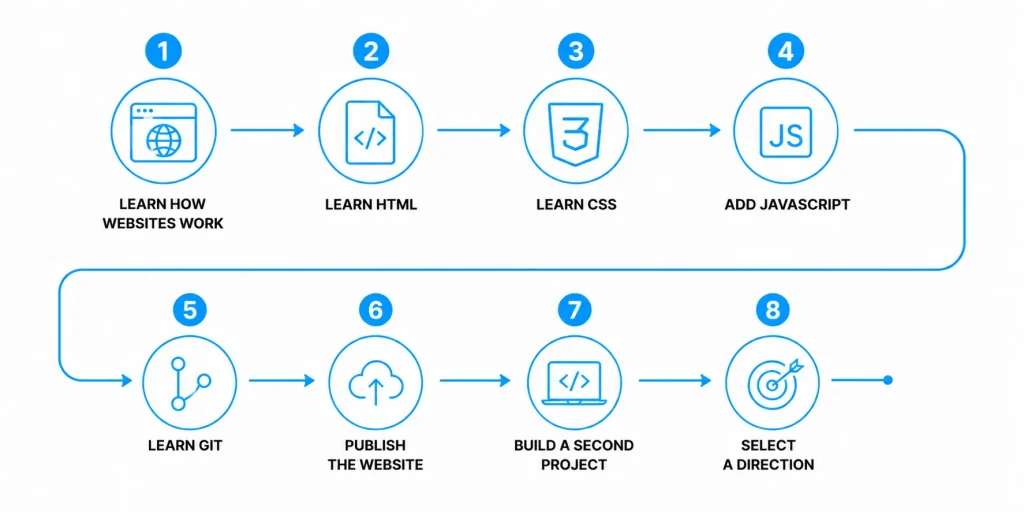
The most effective beginner roadmap combines short learning modules with practical projects.
Step 1: Learn how websites work
Understand browsers, servers, URLs, domains, HTTP requests, hosting, and the difference between static and dynamic websites.
Step 2: Learn HTML
Build a simple page containing:
- A header and navigation
- Headings and paragraphs
- Lists and links
- Images with descriptive alternative text
- A contact form
- A footer
Step 3: Learn CSS
Make the page readable and responsive. Practice spacing, typography, flexbox, grid, and mobile layouts.
Step 4: Add JavaScript
Add a menu toggle, form validation, interactive tabs, or a small calculator. This teaches you how JavaScript responds to user actions and modifies page content.
Step 5: Learn Git
Use Git to track changes. Create meaningful commits and push the project to a remote repository.
Step 6: Publish the website
Deploy your project so other people can access it. Learn how domains, hosting, HTTPS, environment settings, and deployment workflows fit together.
Step 7: Build a second project
Choose a project that introduces data or an API, such as:
- A weather dashboard
- A task tracker
- A personal expense tracker
- A searchable product catalog
- A simple booking interface
Step 8: Select a direction
After learning the basics, choose frontend, backend, or full-stack development based on the problems you enjoy solving.
What Skills Does a Web Developer Need?
Technical skills
A web developer should gradually develop knowledge of:
- Semantic HTML
- Responsive CSS
- JavaScript fundamentals
- Browser developer tools
- Git and collaborative workflows
- APIs and data formats
- Basic database concepts
- Testing and debugging
- Web accessibility
- Application security
- Performance optimization
- Deployment and monitoring
Accessibility should be part of development from the beginning. The Web Content Accessibility Guidelines 2.2 provide testable criteria for making content more accessible to people with disabilities.
Problem-solving skills
Web development involves breaking large requirements into smaller tasks, testing assumptions, investigating errors, and selecting solutions that are appropriate for the project.
Communication skills
Developers frequently work with designers, product managers, QA engineers, clients, and business stakeholders. They need to explain limitations, clarify requirements, document decisions, and raise risks early.
Product thinking
Knowing how to write code is not enough. A developer should understand what the user is trying to accomplish and avoid adding technical complexity that does not improve the outcome.
Common Beginner Mistakes
Learning frameworks before fundamentals
A framework becomes easier to understand when you already know HTML, CSS, JavaScript, browser behavior, and basic programming concepts.
Copying code without understanding it
Before using a code example, identify its inputs, output, dependencies, and failure conditions. Change part of it and observe what happens.
Ignoring mobile users
Test layouts at different screen sizes from the beginning. Retrofitting responsiveness after completing the desktop interface usually creates unnecessary rework.
Treating accessibility as optional
Use semantic HTML, keyboard-accessible controls, visible focus states, sufficient contrast, clear labels, and meaningful alternative text.
Skipping security basics
Validate input, protect credentials, manage permissions, update dependencies, use HTTPS, and avoid exposing sensitive information in frontend code.
Building too much before testing
Release the smallest usable version, gather feedback, and improve it. This applies to learning projects and commercial applications.
How Long Does Web Development Take?
Development time depends on scope, design readiness, integrations, content, security requirements, and feedback speed.
| Project type | Indicative timeline | Typical scope |
| Simple landing page | 1 to 3 weeks | A few content sections and a contact form |
| Small business website | 4 to 8 weeks | Multiple pages, CMS, forms, analytics |
| E-commerce website | 2 to 5 months | Catalog, checkout, payments, order workflows |
| Custom web application | 3 to 9+ months | User roles, database, APIs, workflows, integrations |
| Enterprise platform | 6 to 18+ months | Complex permissions, compliance, migration, integrations |
These ranges are planning examples, not fixed estimates software development cost calculator. A technically simple website can still take longer when content, approvals, or third-party integrations are delayed.
For early budgeting, use our to create a scope-based estimate.
When Should You Work With a Web Development Company?
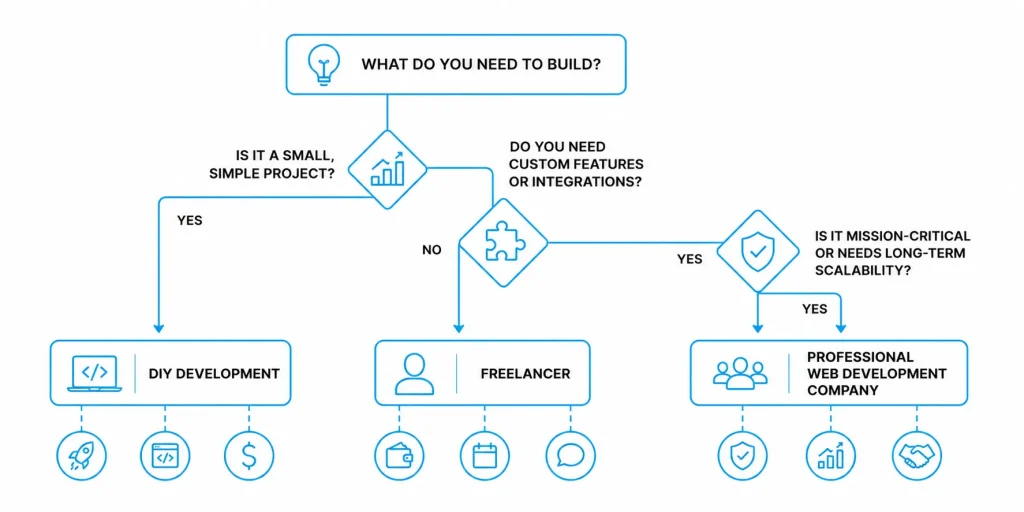
Learning and building independently is suitable for personal projects, prototypes, and straightforward websites. Professional support becomes more valuable when a project involves:
- Complex business workflows
- Multiple user roles and permissions
- Payment or financial data
- Sensitive personal information
- Legacy-system integration
- High availability requirements
- Performance at scale
- Regulatory or contractual requirements
- A fixed commercial launch date
- Long-term maintenance responsibilities
When evaluating a web development company, ask how it handles discovery, architecture, testing, accessibility, security, deployment, documentation, and post-launch support. Also request relevant examples and clarify who will own the source code and infrastructure accounts.
Conclusion
Web development combines structure, design implementation, application logic, data, security, performance, and ongoing improvement. Beginners should start with HTML, CSS, and JavaScript, then build and publish a small project before choosing a specialization.
For businesses, the right approach begins with clear user needs and a prioritized scope. Technology decisions should follow those requirements, not precede them. Whether you are learning to code or planning a commercial platform, progress comes from building, testing, gathering feedback, and improving one practical release at a time.
Frequently Asked Questions
What is web development in simple terms?
Web development is the work involved in building and maintaining websites and browser-based applications. It includes the interface, functionality, database, security, deployment, and maintenance.
Is web development the same as coding?
Coding is one part of web development. Web development also includes requirements analysis, architecture, interface implementation, database design, testing, accessibility, deployment, monitoring, and maintenance.
Which language should a beginner learn first?
Start with HTML and CSS, followed by JavaScript. HTML structures the page, CSS controls its appearance, and JavaScript adds behavior. You can choose a backend language after understanding these browser fundamentals.
Can I learn web development without a degree?
Yes. A degree is not required to begin learning web development. Practical projects, technical understanding, problem-solving ability, and a portfolio can demonstrate skills. Some employers may still require formal qualifications for specific roles.
What is the difference between frontend and backend development?
Frontend development creates the interface users see in their browsers. Backend development manages application logic, authentication, databases, APIs, and server-side operations.
How long does it take to learn web development?
You can learn basic HTML and CSS within several weeks, but becoming job-ready usually requires sustained practice and completed projects. The timeline depends on prior experience, available study time, and whether you focus on frontend, backend, or full-stack development.
Do I need to learn every web development framework?
No. Learn the browser fundamentals first. Then choose one framework that is relevant to your goals or project. Understanding core concepts makes it easier to learn other frameworks later.









 30 mins free Consulting
 8 min read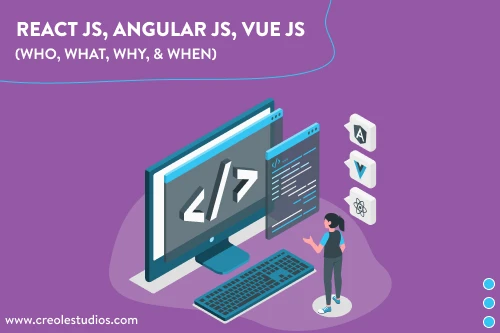

 Canada
 Hong Kong
 United Kingdom





 Love we get from the world