
 Lets Talk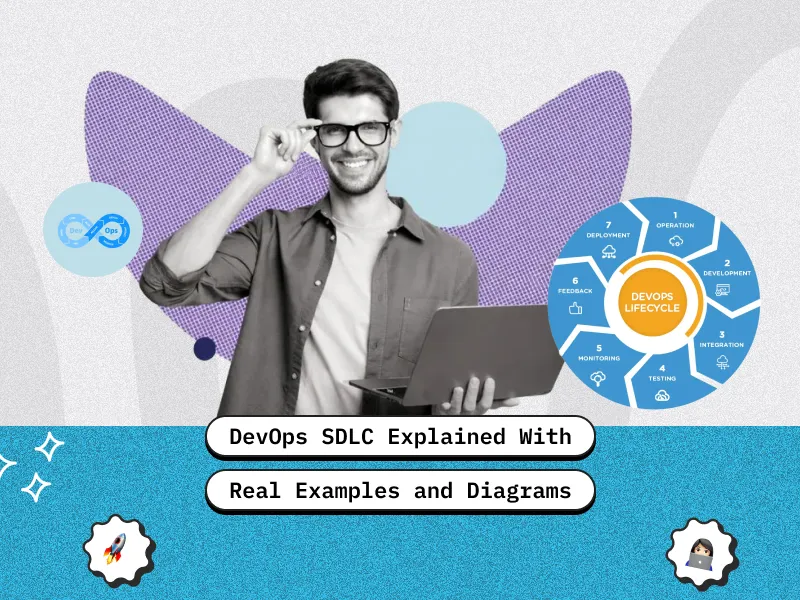
TL;DR
- DevOps SDLC is SDLC run as a continuous loop with shared ownership from planning to production reliability.
- Teams ship small changes frequently using automation (CI/CD, automated tests) to reduce risk.
- Monitoring and user feedback feed directly back into planning, so each release improves the next.
- The process maps well to the DevOps “infinity loop” and the 7 Cs (continuous dev, integration, testing, delivery, monitoring, feedback, operations).
- Tools vary, but the workflow stays the same: plan, code, build, test, deploy, operate, monitor, impro
What is DevOps SDLC?
DevOps SDLC is the software development life cycle practiced as a continuous, shared responsibility between development and operations teams. Instead of handing work from one team to another, the same team owns the software from planning and coding to deployment, monitoring, and improvement.
If you want the foundation first, read What is DevOps in Software Development
The core idea is simple: build small changes, release them safely, observe how they perform in real usage, and use that learning to decide what to do next. Automation, monitoring, and feedback connect each stage so the cycle never truly ends.
The traditional SDLC stages still exist, but in DevOps, they are tightly linked. Planning is influenced by production feedback, testing happens continuously, deployments are automated and repeatable, and operational data feeds directly into future development decisions.
How DevOps SDLC Differs From Traditional SDLC and Agile
SDLC, Agile, and DevOps are often discussed together because they influence how software is delivered. They are not competitors. Instead, they focus on different aspects of the same lifecycle.
- Traditional SDLC defines the stages of software development and typically follows a linear, phase-by-phase flow. It works best when requirements are stable and change is limited, but feedback usually arrives late, and releases are large and risky.
- Agile improves SDLC by introducing short iterations and frequent reviews. Teams learn faster because working software is delivered in small increments. However, Agile alone does not always address what happens after code is written—deployment, infrastructure, and production stability may remain separate concerns.
- DevOps builds on both SDLC and Agile by focusing on how changes move safely from code to production and stay reliable afterward. It connects development, testing, deployment, operations, and monitoring into one continuous system with shared ownership and fast feedback.
DevOps SDLC diagram

This looping approach is the heart of What Is Continuous Development in DevOps, where teams build and improve in small cycles instead of big one-time releases.
DevOps SDLC stages with a real example anyone can understand
To keep this simple, imagine you are building a food delivery app. DevOps SDLC is the “repeatable routine” your team follows to plan, build, release, run, and improve the app again and again.
Think of it like a loop:
You build something small → release it → watch how it performs → learn from users → improve it → repeat.
1) Plan
This is where the team decides what to build and why.
- Collect requests from users, business teams, support, and stakeholders
- Convert them into a backlog (a prioritized to-do list)
- Pick what to ship first based on impact, effort, and risk
Example: Users ask for “Track delivery person on map.”
The team agrees on clear success rules like:
- map updates every X seconds
- location accuracy within a certain range
- tracking works even during peak dinner hours
2) Analyze and design
Before writing code, the team makes sure they are building the right solution.
- Decide how the feature should work technically (basic architecture)
- Plan test scenarios early so bugs do not surprise you later
Example: For live tracking, the team decides:
- should tracking be its own service or part of an existing system?
- what happens if GPS is off, internet is slow, or updates are delayed?
3) Code
Now developers write the feature and store it safely in a shared place.
- Version control (Git) keeps history of changes and prevents overwrites
- Code reviews reduce mistakes and improve quality
- Code is written with real-world constraints in mind (security, performance, reliability)
Example: The team uses a feature flag, so tracking can be turned on for only 5% of users first, instead of everyone at once.
4) Build
This stage turns code into something that can actually run.
- A CI tool (like Jenkins) automatically builds the app when new code is pushed
- It checks for code quality issues and creates a deployable package (“artifact”)
Example: Developer pushes tracking code to GitHub.
Jenkins automatically:
- compiles/builds it
- runs quick checks
- stores the build output for deployment
5) Test
Testing makes sure new changes do not break the app.
- Automated tests run after every change (so bugs show up early)
- Testing happens at different levels: small parts, integrated parts, full user flows
- Edge cases are tested (weird but real situations)
Example: Team adds “Apply coupon at checkout.” Tests confirm:
- valid coupon works
- invalid coupon does not crash the app
- total price updates correctly
- checkout still completes successfully
Quick understanding of test types
| Test type | What it checks | Food app example |
| Unit testing | One small function | Coupon calculation logic |
| Integration testing | Two parts working together | Checkout + payment gateway |
| End-to-end testing | Full user journey | Login → cart → coupon → pay → order confirmed |
6) Release and deploy
This is how tested code moves into real environments.
- Staging: looks like production, used for final team checks
- UAT: product owner or customer verifies it meets expectations
- Production: live app for real users
Continuous Delivery vs Continuous Deployment
- Continuous delivery: everything is ready to ship, but humans choose when to push live
- Continuous deployment: if tests pass, it ships automatically
Example: “Refer & Earn” is ready, but marketing wants to launch it on the weekend campaign, so the team holds it and deploys at the right moment. That is continuous delivery.
Safer ways to release
- Canary: release to a small % of users first
- Blue-green: switch traffic between old and new version safely
- Feature flags: ship code but keep it off until enabled
If your goal is faster releases without increasing production risk, this is a core part of Accelerate time-to-market with DevOps CI/CD: what growing startups must implement.
7) Operate
Now the app is live. The goal is: keep it stable and available.
- Maintain consistent configuration across environments
- Prepare for traffic spikes (lunch/dinner rush)
- Reduce downtime using safe update methods and backups
Example: Payment system update is done using rolling updates, so users can still place orders while servers update in the background.
8) Monitor
Monitoring tells you what is happening in the real world.
- Track signals like speed, errors, CPU, memory, traffic, logs
- Set alerts so teams know about issues before customers complain
- Watch for unusual behavior that could also signal security risks
Example: “Order History” becomes slow at dinner time.
Prometheus detects response time spikes, Grafana shows when it happens, and the team fixes the bottleneck by scaling resources or optimizing the database query.
9) Feedback
This is where you learn what users actually experience and what needs improvement.
- Sources: reviews, support tickets, surveys, analytics, user interviews
- Feedback becomes input for the next planning cycle
Example: Users say tracking updates are slow.
The team improves update frequency, optimizes the tracking service, and ships the improvement in the next release.
The 7 Cs of DevOps and how they map to SDLC
The “7 Cs” are an easy way to understand why DevOps SDLC feels like a loop. Traditional SDLC describes stages (plan, build, test, deploy). The 7 Cs describe the behavior you apply across those stages: everything is designed to run continuously, in small batches, with fast feedback.
Here is how the 7 Cs map to common SDLC stages:
| 7 Cs of DevOps | What it means in simple terms | SDLC stages it supports |
| Continuous development | Plan, code, and improve in small iterations instead of big batches | Plan, Analyze, Code |
| Continuous integration | Merge code frequently and automatically validate it so the main branch stays healthy | Build |
| Continuous testing | Run automated tests on every change so bugs are caught early | Test |
| Continuous delivery / deployment | Keep every change release-ready and deploy safely (manual approval for delivery, fully automated for deployment) | Release, Deploy |
| Continuous monitoring | Watch production health and performance in real time | Monitor |
| Continuous feedback | Turn user behavior, reviews, and support issues into backlog priorities | Feedback |
| Continuous operations | Keep systems stable with minimal downtime using reliable ops practices | Operate |
SDLC tells you what steps exist. The 7 Cs explain how those steps should run in a DevOps setup: continuously, automated where possible, and tightly connected through feedback.
Toolchain map for DevOps SDLC
DevOps is not about using one “perfect” toolset. Most teams mix tools based on budget, cloud provider, and existing stack. What stays consistent is the workflow: plan work, manage code, automate builds and tests, deploy safely, manage infrastructure as code, and monitor everything in production.
Use this table as a practical reference for how common tools map to each DevOps SDLC phase:
| Phase | Common tools | What these tools help you do |
| Plan | Jira, Trello, Asana | Manage backlog, user stories, sprint planning, ownership, timelines |
| Code | Git, GitHub, GitLab, Bitbucket | Version control, branching, pull requests, code reviews |
| Build and CI | Jenkins, GitHub Actions, CircleCI | Auto-build on commits, run unit tests, create artifacts |
| Test | Selenium, JUnit, TestNG, Postman, SonarQube | Automated UI/API tests, regression checks, code quality and security scanning |
| Deploy and CD | ArgoCD, GitLab CI/CD, Kubernetes, Docker | Automated releases, progressive rollouts, container deployment, orchestration |
| IaC and config | Terraform, Ansible, Chef, Puppet | Provision infrastructure, enforce configuration consistency, reduce drift |
| Monitor and logs | Prometheus, Grafana, ELK Stack, Datadog, Splunk | Metrics, dashboards, alerts, log aggregation, incident detection |
Best practices that make DevOps SDLC work
DevOps SDLC succeeds when teams treat it as a system, not just a set of tools. The practices below are what keep the loop fast, stable, and predictable even as software changes every day.
Foster collaboration across teams
DevOps breaks the “throw it over the wall” habit. Development, QA, ops, and security should share ownership of:
- release readiness
- production stability
- incident response and fixes
Practical habit: define shared KPIs like deployment frequency, change failure rate, and time to recovery, so everyone optimizes the same outcomes.
Automate build, test, and deploy
Automation is what makes continuous delivery possible.
- builds trigger automatically on commits
- tests run without waiting for humans
- deployments are repeatable and consistent
This reduces manual mistakes and shortens the time from “code written” to “code running.”
Keep releases small and frequent
Smaller releases are easier to review, test, deploy, and roll back.
- fewer changes per release = easier root cause analysis
- fewer surprises in production
- faster recovery if something goes wrong
This is one of the biggest practical differences between DevOps teams and teams that “release once in a while.”
Adopt Infrastructure as Code
Infrastructure as Code (IaC) makes environments reproducible by keeping infra setup version-controlled and repeatable across dev, staging, and production. It also reduces “single-person dependency” because your infrastructure knowledge lives in code, not in one engineer’s head. If that risk sounds familiar, read why infrastructure as code is your ultimate business insurance.
- same setup in dev, staging, and production
- fewer “works on my machine” issues
- reduced configuration drift over time
It also makes infrastructure changes trackable, reviewable, and auditable like application code.
Invest in monitoring and feedback loops
Monitoring and feedback close the loop after deployment.
- monitoring tells you what the system is doing (latency, errors, resource usage, logs)
- feedback tells you what users are experiencing (reviews, tickets, analytics)
Together they guide what to fix, optimize, or build next.
Build a culture of learning
DevOps maturity comes from continuous improvement.
- run blameless post-incident reviews
- document what failed, why it failed, and how to prevent it
- improve runbooks, alerts, tests, and standards over time
Teams that learn systematically reduce repeat incidents and ship with more confidence.
Common mistakes to avoid
DevOps SDLC is meant to make software delivery smoother. But a few common mistakes can make it feel messy, stressful, and unreliable. Here are the same points in plain language.
1) Buying tools but keeping the same “team silos”
Mistake: Teams still work like this:
- developers build it
- QA tests it
- ops “handles production”
Even if you add automation, this mindset stays the same, so problems still bounce between teams.
Simple fix: Make delivery a shared job. Everyone should care about “did it go live safely?” and “is it working for users?”
2) Tests that fail randomly
Mistake: Some automated tests fail sometimes even when nothing is actually broken.
That creates a “false alarm” situation.
What happens next:
- people stop trusting the pipeline
- they rerun builds until it passes
- real problems get ignored because everything looks noisy
Simple fix: Treat unreliable tests like real bugs. Fix or temporarily disable them until they become stable again.
3) Releasing too many changes at once
Mistake: Shipping a big update with lots of changes in one go.
Why it’s risky:
- if something breaks, it is hard to know what caused it
- fixing takes longer
- rollback becomes painful
Simple fix: Release in smaller chunks more often. Smaller changes are easier to test, easier to roll back, and safer for users.
4) Too many alerts and notifications
Mistake: Monitoring tools send alerts for everything, even small issues.
What happens:
- teams get alert fatigue
- important alerts get missed
- people start ignoring notifications
Simple fix: Only alert for things that truly affect users (slow app, failed payments, downtime). Keep alerts meaningful and actionable.
5) Using too many tools that do the same thing
Mistake: Adding new tools constantly without removing old ones.
This creates:
- confusion (“where do we check what?”)
- extra training for every new hire
- more things to maintain and pay for
Simple fix: Keep the toolchain simple. Use fewer tools, integrate them well, and remove anything that overlaps too much.
Conclusion
DevOps SDLC explains how software development changes when teams take shared responsibility for both delivery and production stability. Instead of treating planning, coding, testing, deployment, and operations as separate handoffs, DevOps connects them into a continuous loop driven by automation, monitoring, and feedback.
In practice, this means teams work in smaller increments, release more frequently, and learn from real production data rather than assumptions. Failures are easier to detect, fixes are faster to apply, and improvements are guided by how the system and users actually behave in the real world.
DevOps SDLC does not replace SDLC stages or Agile planning. It changes how those stages operate continuously instead of sequentially, collaboratively instead of in silos, and with feedback influencing every decision. Understanding this loop helps teams design delivery systems that scale with product growth while maintaining reliability over time.
If you want help implementing this loop in your own stack, our DevOps consulting services can help you standardize CI/CD, introduce Infrastructure as Code, set up observability, and establish incident-ready runbooks so DevOps SDLC becomes a repeatable operating system, not a one-off initiative.








 30 mins free Consulting
 10 min read






 Love we get from the world